We use cookies on our website to analyze website usage and to help secure the website against misuse.
Advertising and functional cookies are not used in our site or our web application products.
By clicking “Accept Essential Cookies Only”, you consent to us placing these cookies.
The xAssets SAM engine is an enterprise-ready Software Licensing Compliance system built with the following design goals:
Achieve a defensible compliance position in short timeframes
Low maintenance
Performance, security and scalability suitable for large enterprises
The system is built around temporal accounting principles. This allows you to prove compliance at any point in time.
Once compliant, it's easy to stay compliant, and you are ready for an audit with no preparation needed.
A powerful affinity model allows you to control licensing priorities, requirements, and scope without the need to assign every license.
The system keeps itself up to date as follows:
Discovery and integrations run on a daily schedule
The Licensing calculation is scheduled to run each month
Automated alerts cover license compliance issues
Automated import of new licenses
Keeps track of renewal dates
Licenses are automatically freed when devices are disposed of
This frees up your SAM consultants to focus on the most important processes:
Find license purchases and license evidence
Match license purchases to recognized software products
Renew expiring licenses
Analyze reports
Optimize calculations with overrides, rules, requirements, and scope
Recalculate when needed
Achieve software compliance quickly
Enterprise implementations can be completed in short timescales because the source data is
pushed through the same recognition engine regardless of source.
Discovery and integrations like SCCM, Tanium, ServiceNow and Intune can feed the license model.
xAssets has an excellent architecture to achieve compliance quickly:
Agentless and agent based discovery
Software recognition is done by xAssets
Allocates licenses automatically
Hosted or on-premise
Discover the network and cloud sources
Recognise installed software
Import license evidence or purchases
Reconcile
Calculate the license position
The out-of-the-box configuration fits most organisations. Easy configurability extends the system to exact requirements.
License calculation engine
The calculation engine is fast and designed to handle complex licensing scenarios.
For example, a 32-core server might be covered by two 16-core
licenses from different purchase orders, even from different time periods.
A license pool may be departmental, location based, country specific, or globally available.
A current-version license covers earlier versions under specific downgrade rules. The xAssets SAM engine handles each of
these scenarios out of the box.
Temporal calculation engine
The temporal calculation engine provides an accounting-style transaction based mechanism for storing software compliance related events.
There are three main events:
Consumption - when an endpoint starts consuming a license
License - when a license comes into effect
Grant - when a license seat is allocated to a consumption
Consumptions are posted on the asset's date in service, or when the software was installed. Licenses are posted on the date the license comes into service.
Grants are posted on the date the grant is awarded, that is, when a consumption receives a covering license.
The engine can optionally swap previous assignments to optimise costs when material changes occur.
Recalculating any period deletes transactions from that period forward
and recreates them, preserving prior history.
Effective license position can be reported at any point in time.
Affinity-based allocation
Every license-consumption pair is ranked for affinity matching and requirements compliance across
predefined dimensions including:
Department
Location
Cost centre
Hierarchy proximity
User
CPU architecture
Core count and core affinity
New dimensions can be added for any field in the computer and license asset data structures.
Core based affinity works similarly
Server licenses prefer servers with many cores
Core licenses prefer servers with fewer cores
These rules are configured within the "Affinity Rule Engine" and many other forms of affinity can be covered.
Licenses for a product are considered against all consumptions of a product, and within the constraints of your allowed
requirements, the license-consumption pair with the highest affinity will get matched first.
Software recognition
Recognition matches discovered titles to a manufacturer, product, edition and version.
xAssets uses a recognition database combined with pattern recognition engine termed "MPEV" — Manufacturer, Product, Edition, Version.
A single rule for "Microsoft Visio Professional" resolves "Microsoft Visio Professional 2019", "Microsoft Visio
Enterprise 2024" and "Microsoft Visio Standard 2026", because the year and edition are extracted from the title
text at recognition time.
All software recognition issues are resolved by xAssets without customer involvement.
They are added to the central recognition database, and published to every hosted and on-premise installation.
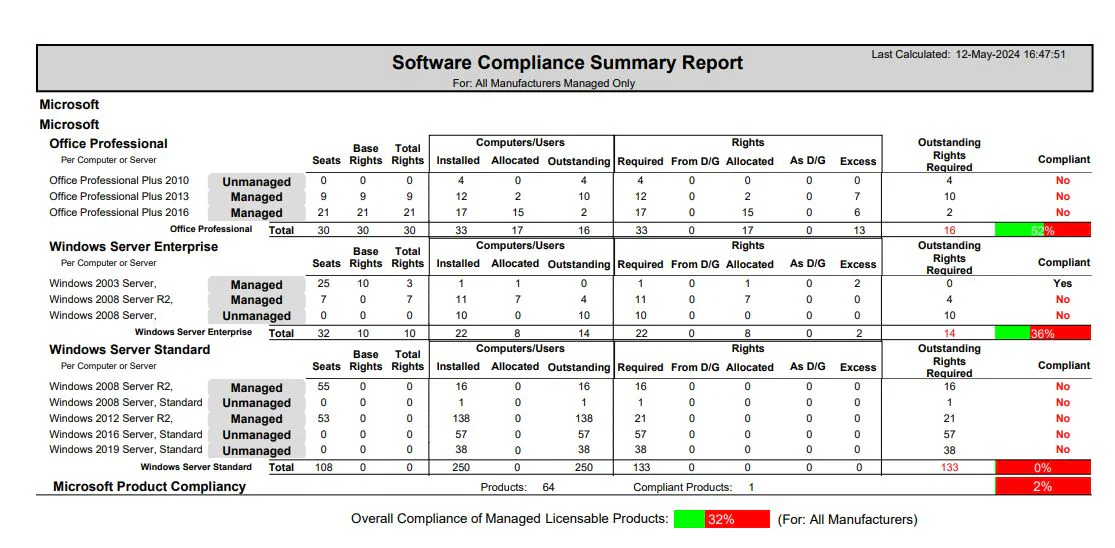
Sample compliance report
Fast, accurate, agentless and agent-based discovery
xAssets Network Discovery is the same engine used in the IT Asset Management product. Discovery is agentless on
managed networks, with optional agents for off-network and work from home endpoints. The discovery engine covers Windows,
VMware ESX, Linux, Unix, Apple Mac, IBM AIX, SNMP equipment and SSH equipment.
For SAM, the relevant outputs are:
Windows "Programs and features"
Executable file headers and on-disk file scans for software not in Add/Remove
Operating system and edition
SQL Server instances and CPU cores per instance
Services running on servers and desktops
AutoRun entries from local user and system registry
Hardware including CPU cores, physical processors, and virtual or physical status
The discovery information passes through the recognition engine and this drives the license calculation.
CPU cores are used for per-core licensing, physical processors feed into per-processor licensing, and
virtual or physical status is used where licenses require separate allocation strategies.
Agentless
no endpoint installation, no footprint
Superfast
70 nodes per second, around 4 seconds per node
SAM-grade data
registry, EXE headers, services, SQL Server instances
Remote endpoints
optional agent for off-network devices
Virtual friendly
VDI and virtual guests discoverable without host load
Scalable
hundreds of parallel discoveries supported
Integrate to any source of asset or license data
xAssets ships with prebuilt integrations including the following:
New integrations can be built either as part of an implementation project or post-implementation.
Pricing
xAssets SAM is available as part of the Enterprise Edition of xAssets IT Asset Management Software.
Free instances are free forever and can show demo data or your data.
IT asset management free instances
Single user, 100 endpoints, 1,000 total assets
Includes network discovery (optional)
SNMP based devices are included free
Single Sign On (SSO)
Does not support Intune, SCCM, procurement, contracts, barcoding, configuration, or workflow
Fixed asset management free instances
Single user, 1,000 fixed assets
Includes all fixed asset register features
Single Sign On (SSO)
Does not support depreciation, CIP, procurement, barcoding, planned maintenance, configuration, or workflow
During Evaluation
No licensing, integration, or module restrictions
Strategic advice
All the expert help you need
Written proposal and quote
A Large Telecom Provider
Achieved our targets in half the time
We needed agentless discovery, strong reporting and BI, notifications and workflows adjusted to fit our processes. This was done quickly and efficiently by the implementation team. We were up and running within a couple of days and we can use the product from any mobile device or browser so we don't have to maintain clients or agents. Very happy.
Pros: The implementation team are awesome. We provided them with a simple list of needs and they were able to go far beyond this in a relatively short time scales just from their experience and insight. Within a couple of days we had a full network discovery of 4,000 nodes completed, and SCCM integration was completed for our NJ network as soon as access was granted.
Cons: Not much to complain about, the software itself is very good. Reporting in SAM and ITAM will always be complex, but the query drilldown capabilities within the product allowed us to build a custom set of onscreen reports very quickly so we can see exactly where our ITAM function needs attention
Allocation rules are defined in a configurable ruleset which can be changed in the user interface.
Built-in rules cover department, location, cost-centre
and custodian matching, with exact and hierarchy variants, plus CPU architecture and core-count preferences.
Custom rules can be added per customer using calculated fields. Direct asset-to-license
assignment overrides affinity where required.
License type coverage
Per user
Per computer
Per physical core
Per physical processor
Concurrent user
Subscription with start and end dates
Free and developer editions tracked but not licensed
Reporting and data model
Every SAM metric is available as a calculated field that can be combined with any other asset attribute
in user-defined queries and reports. Field names prefixed with "Product" aggregate across all licenses for a product;
the other fields are computed at the individual license level.
Click here to view a table of Calculated Fields available to SAM queries and reports
Field
Meaning
Consumption — what is installed
ProductInUse
Total rights consumed by all installations of this product
ProductInstalled
Distinct computers with this product installed, regardless of license type
ProductInstalledPhysical
As ProductInstalled, restricted to physical assets
ProductInstalledVirtual
As ProductInstalled, restricted to virtual assets
ProductUsers
Distinct custodians (users) with this product installed
License capacity — what was purchased
Seats
Capacity of this individual license (users, computers, cores or processors)
Rights
Alias for Seats
ProductSeats
Total capacity across every license held for this product
ProductRights
Alias for ProductSeats
ProductLicenses
Count of distinct license records held for this product
Allocation — what the engine matched
RightsAllocated
Capacity from this individual license that has been allocated to cover consumptions
ProductRightsAllocated
Capacity allocated to cover consumptions of this product, summed across all of its licenses. A downgrade grant counts against the older product receiving coverage
RightsGranted
Total capacity drawn from this license, including capacity given away as downgrade coverage to older products
ProductRightsGranted
Total capacity drawn from this product's licenses including downgrades
RightsAllocatedPhysical
As RightsAllocated, restricted to grants on physical assets
RightsAllocatedVirtual
As RightsAllocated, restricted to grants on virtual assets
ProductRightsAllocatedPhysical
As ProductRightsAllocated, restricted to physical assets
ProductRightsAllocatedVirtual
As ProductRightsAllocated, restricted to virtual assets
ComputersAllocated
Distinct computers covered by this individual license
ProductComputersAllocated
Distinct computers covered for this product across all of its licenses
UsersAllocated
Distinct users covered by this individual license
ProductUsersAllocated
Distinct users covered for this product across all of its licenses
Downgrade — newer license covering older product
AllocatedAsDowngrade
Capacity from this individual license that was used to cover earlier-version consumptions via a downgrade
ProductAllocatedAsDowngrade
Giver perspective at product level — total capacity this product's licenses gave away to cover older products
ProductAllocatedFromDowngrade
Receiver perspective at product level — total capacity this product received from newer products' licenses
ComputersAllocatedAsDowngrade
Distinct computers covered by this license through a downgrade grant
ProductComputersAllocatedAsDowngrade
Giver perspective — distinct computers covered by this product's licenses via downgrade grants to older products
ProductComputersAllocatedFromDowngrade
Receiver perspective — distinct computers of this older product that were covered by newer products' licenses via downgrade
Derived — computed from the fields above
UnusedRights
Spare capacity on this license: Seats minus RightsGranted. A negative value indicates over-allocation
ProductUnusedRights
Spare capacity at product level: ProductSeats minus ProductRightsGranted
ProductOutstandingRequirement
Compliance deficit in rights. A positive value is the number of additional rights needed to be compliant
ProductComputersOutstanding
Compliance deficit in computer count. Useful when the metric of interest is number of computers rather than rights or cores
Security and deployment
Hosted by xAssets, or on-premise in customer data centres
Single Sign On
SCIM provisioning for user lifecycle
Row-level security through the rights and roles engine
Full audit trail of data changes
Database backups and point-in-time restore
Per license scope rules
Each product and license can carry a scope which allows department,
location or cost-centre matching either as a preference, or as a requirement.
A license for the New York office can be restricted to assets in New York, or can prefer assets in New York (or in sub-locations within New York).
When installed on the product, all licenses follow the rule unless a license contains a more specific rule.
Defaults inherit from the product catalogue, so scoping can be set once and applied globally.
Multiple license coverage
Two or more licenses can be used to cover a single consumption. For example, a 32-core server bought in 2022 with a 16-core license,
topped up with a second 16-core license in 2024, is fully covered. Both licenses are attributed and both
purchase events appear on the license records.
Downgrade and free editions
Downgrade rules can be set per product and can be "any earlier version", "one version back", or "no downgrade". Both giver and
receiver perspectives are reported.
Free editions (Express, Developer, Community) are tracked as consumptions without grants and do not consume paid capacity.
Common questions
How long does implementation take?
Discovery and integrations feed the license model through the recognition engine, so a CMDB cleanup project is usually unnecessary regardless of the data source.
In most implementations, sourcing and reconciling license evidence is the most time-consuming task.
Number of endpoints
Expected implementation time
1,000
1-2 weeks
5,000
2-8 weeks
10,000
1-3 months
50,000
2-6 months
What are the query response times and calculation times for large enterprise SAM databases?
The query and calculation engines have been designed to be scalable and fast. Typical response times from testing are listed below:
Number of endpoints
Expected query response times
Expected calculation time for one month
Expected calculation time for all time
1,000
< 1 second
< 1 second
< 1 second
5,000
1-3 seconds
10 seconds
30 seconds
10,000
2-5 seconds
25 seconds
1-2 minutes
50,000
3-8 seconds
1-2 minutes
5-10 minutes
Is xAssets SAM hosted or on-premise?
Both models are supported. xAssets SAM is available as a hosted service in our data centres,
or on-premise in a customer data centre.
Which discovery sources are supported?
Native agentless discovery covers Windows, VMware ESX, Linux, Unix, Apple Mac, IBM AIX, SNMP and SSH equipment.
A discovery agent is provided for work-from-home computers and remote endpoints.
Integration sources include Intune, SCCM, Tanium, and ServiceNow.
Custom integrations are delivered as configuration.
Which license metrics are supported?
Per user, per computer, per physical core, per physical processor, concurrent user, and subscription.
Free and developer editions are tracked as consumptions without grants.
Points-based licensing scenarios can also be supported by the calculation engine.
How does xAssets handle complex licensing scenarios?
Multi-license coverage, downgrade rules, per-license scope rules and direct assignment are supported by the
engine. Customer-specific rules can be added through configuration without source-code changes.
The engine supports both affinity based rules and hard requirements.
Product and license scopes can be applied to affinities and requirements.