Explain Allocations
When a product shows a shortfall, the next question is always "why". Explain Allocations answers it: for one product, it breaks every installation down into the reason the calculation did or did not cover it.
Open a product from Licensing → Licensing Position, then choose Software → Explain Allocations.
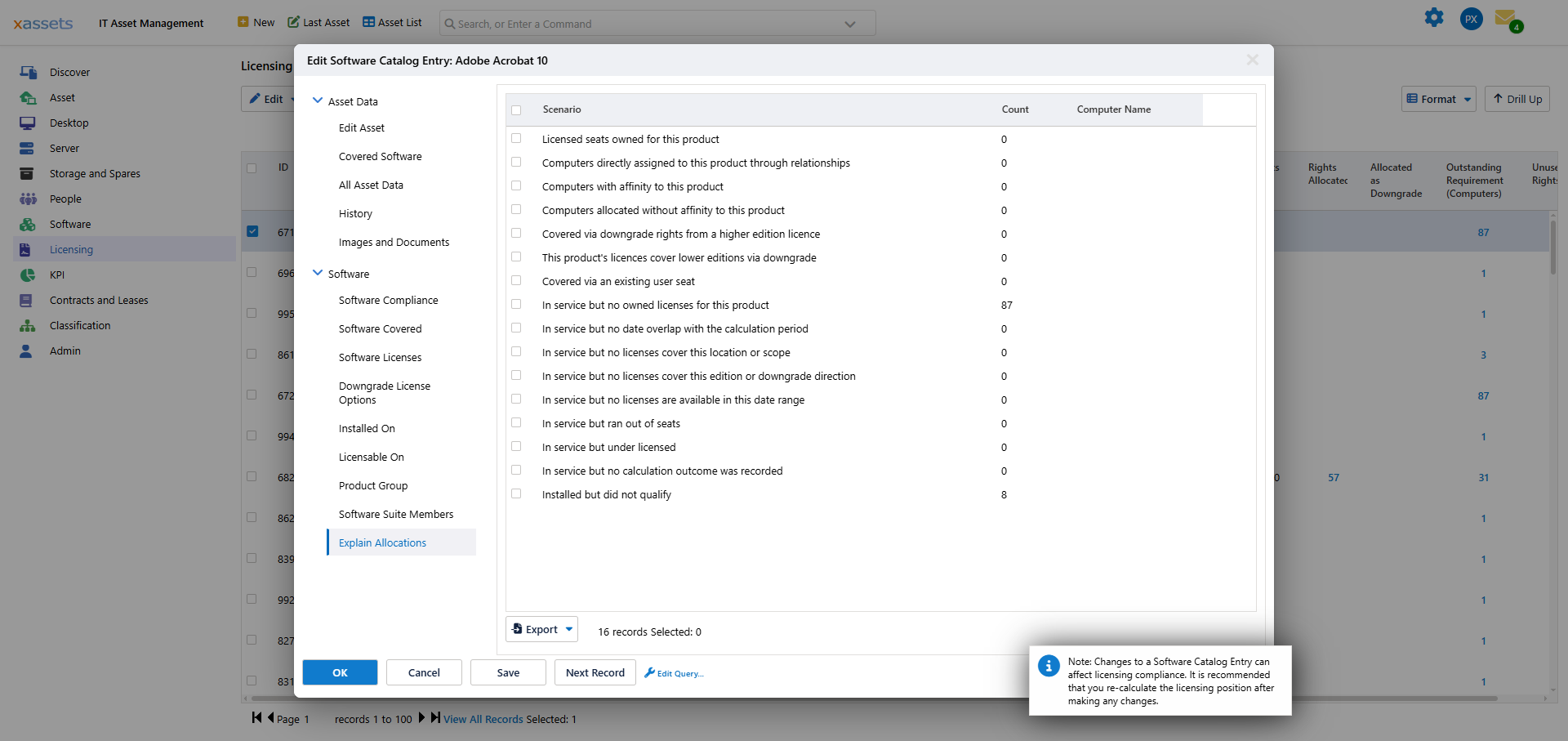
Every installation of the product lands in exactly one row, so the counts add up to the whole picture. Tick a row to see which computers it covers, and Export sends the breakdown out for sharing.
What Each Scenario Means
The rows fall into three groups.
Covered
These installations have a license behind them. If your position is compliant, this is where everything sits.
| Scenario | Meaning |
|---|---|
| Licensed seats owned for this product | Seats you own for this product |
| Computers directly assigned to this product through relationships | Covered because somebody assigned the license to that machine explicitly |
| Computers with affinity to this product | Covered by a license the calculation judged a good match — same location, cost centre, department or custodian |
| Computers allocated without affinity to this product | Covered by a license that fit on capacity, with nothing to make it a preferred match |
| Covered via downgrade rights from a higher edition licence | Covered by a license for a higher edition, exercised downwards |
| This product's licences cover lower editions via downgrade | This product's licenses being spent covering something below it |
| Covered via an existing user seat | Covered because the person already holds a seat, so the machine needs no separate right |
Direct assignment beating affinity, and affinity beating plain capacity, is the order the engine works in. See Auto Allocation.
Not Covered
These are the shortfall. The distinction between them is what tells you whether you need to buy something or fix something.
| Scenario | Meaning | Usually means |
|---|---|---|
| In service but no owned licenses for this product | Nothing owned for this product at all | Buy, or the product should not be licensable |
| In service but no date overlap with the calculation period | Licenses exist, but none valid during the period being calculated | Check the calculation period and licence dates |
| In service but no licenses cover this location or scope | Licenses exist, but scoping rules keep them away from this machine | Check the scoping rules |
| In service but no licenses cover this edition or downgrade direction | Licenses exist for a different edition and cannot legally cover this one | Check edition and downgrade rules |
| In service but no licenses are available in this date range | Licenses exist and are in scope, but not valid on the dates needed | Renewal gap |
| In service but ran out of seats | Everything lined up, but the seats were used up | Buy more seats, or reclaim some |
| In service but under licensed | A shortfall recorded without a more specific cause | Investigate individually |
| In service but no calculation outcome was recorded | The engine reached no conclusion for this installation | Recalculate; report it if it persists |
"No owned licenses" versus "ran out of seats" is the most useful distinction on the screen. The first is a purchasing gap. The second means you own the right product and simply need more of it — or need to reclaim what is not being used.
"No licenses cover this location or scope" is the one most often caused by configuration rather than a genuine shortage. You own enough seats; the rules are stopping them reaching these machines. See Per-Product Scoping.
Excluded
| Scenario | Meaning |
|---|---|
| Installed but did not qualify | The product is installed, but the installation was not counted as needing a license |
Installations land here when they are out of service, outside the calculation period, or on an asset type that does not consume licenses. A non-zero count is normal. A count that looks too high is worth opening up, because anything wrongly excluded is a shortfall you cannot see.
Working With It
- Start at the bottom. The not-covered rows are the shortfall — everything else is context.
- Separate buying from fixing. "No owned licenses" and "ran out of seats" cost money. Scope, edition and date rows are usually configuration.
- Tick a row to name the machines. A count tells you the size of the problem; the computer list tells you where it is.
- Recalculate after changes. The breakdown reflects the last calculation run, not the current state of the data.
Related Reading
- Running the Calculation
- Auto Allocation — the order the engine allocates in
- Per-Product Scoping — why a license may not reach a machine
- Downgrade Rules
- Identify Under-Licensed Products