Data Quality Checks
The License Dashboard → Licensing Calculation Steps tab is the SAM data-quality dashboard. It runs a consolidated set of diagnostic checks and surfaces problems that would otherwise produce silently-wrong compliance numbers. This page covers what each check means and what to do when one is non-zero.
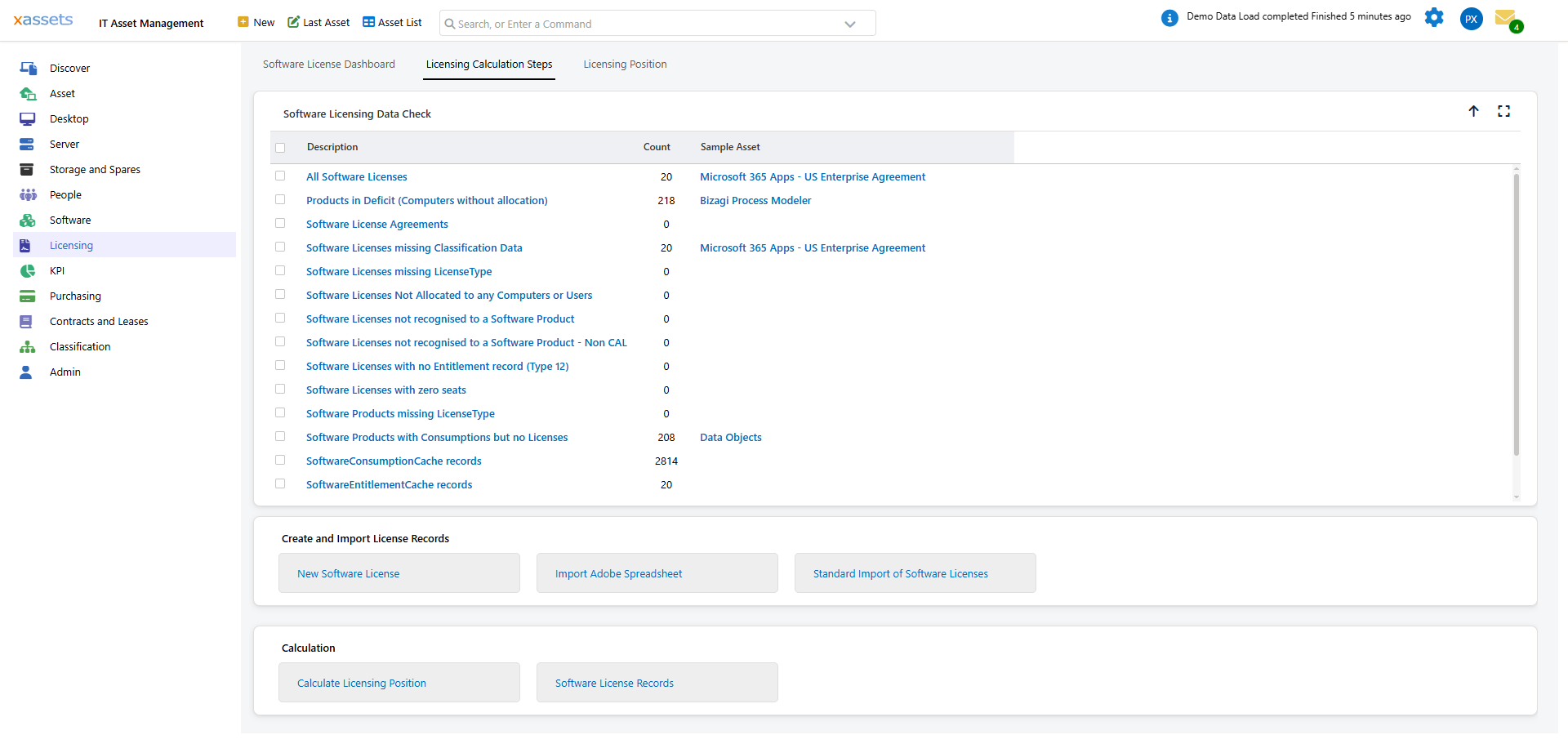
Reading the Dashboard
Each row shows a check name, a count, and a sample asset. The check name itself is a clickable link — click it to open a query showing the offending records. The Sample Asset column links to the specific record named there.
A non-zero count is an issue to investigate. The order is meaningful: rows are grouped by area (hardware, license fields, allocation rules, catalog, compliance summaries) and ordered roughly by severity within each area.
Hardware / Asset Issues
These affect the engine's ability to anchor consumption start and end dates correctly.
| Check | Non-Zero Means |
|---|---|
| Hardware missing DateInService | In-service hardware with installed software but no DateInService. The engine cannot determine when consumption starts. Fix immediately — set DateInService on each affected asset. |
| Assets with DateDisposedOf but Status In Service | Disposal date populated but the asset's StatusID still resolves to in-service. The engine ignores DateDisposedOf until Status.InService = false, so the asset keeps consuming. Either flip StatusID or clear DateDisposedOf. |
Software License Field Issues
| Check | Non-Zero Means |
|---|---|
| Software Licenses missing key dates | License has no DatePurchased or no DateInService. The engine cannot determine when the license becomes available. Fix immediately. |
| Software Licenses missing LicenseType | License has no License Type — excluded from the position entirely. The license you spent money on is not contributing capacity. Fix immediately. |
| Software Licenses missing LicenseSeats | License has zero or NULL LicenseSeats — contributes no capacity. Fix or set Status to Out of Service. |
| Software Licenses missing Classification Data | License lacks one or more of: SoftwareLicenseVersion, SoftwareManufacturer, LicenseCode, LicenseClass, LicenseType, ProductCode, LicenseSeats. Affinity scoring may be wrong. |
| Software Licenses not Recognised to a Software Product | License records whose SoftwareCatalogEntry does not link to a valid catalog entry — orphaned. Won't appear under any product on the position. Fix immediately. |
License Allocation Outcome
| Check | Non-Zero Means |
|---|---|
| Software Licenses Not Allocated to any Computers or Users | License has zero RightsAllocated (no Type-13 grant transactions). Either over-supply (close to renewal — bought more than needed) or unable-to-allocate (eligible consumptions exist but the license is excluded by location/department/Allocation Rule mismatch). |
Allocation Rule Mismatches
These three are specific to the per-license Allocation Rule field (LicenseAllocationRule). A license whose effective Allocation Rule (after catalog inheritance) requires a dimension but lacks a value for it will silently exclude every consumption.
| Check | Non-Zero Means |
|---|---|
| Location-required Software Licenses without Location | License has Allocation Rule including the Location bit (or inherits it from the catalog) but LocationID is NULL. Set Location, or change Allocation Rule on the license or catalog. |
| Department-required Software Licenses without Department | Same shape — Allocation Rule requires Dept, but DepartmentID is NULL. |
| Cost Centre-required Software Licenses without Cost Centre | Same shape — Allocation Rule requires Cost Centre, but CostCentreID is NULL. |
These are the most common "where did my grants go?" failure modes after enabling per-license scoping. See Customizing the Calculation: Per-Product Scoping for the field semantics.
Software Catalog Issues
| Check | Non-Zero Means |
|---|---|
| Software Catalog Entries missing LicenseType | Catalog entry with no LicenseType where consumptions exist — engine cannot meter consumptions for these products. Fix immediately. |
| Software Catalog Entries with no defining titles | Catalog entry exists but no AssetDetailSoftware row marks any title as defining. No consumptions will ever post for this product. Add at least one defining title via the Software Catalog editor. |
Compliance Summaries
These are not data-quality checks per se — they're summaries of the calculation outcome. Some non-zero is expected; sudden growth is the signal.
| Check | What It Reports |
|---|---|
| Software Products with Consumptions but no Licenses | Products you have installed but for which you own no licenses at all. May be unlicensed compliance risk, software being trialed (track expiry), or free software classified as paid (set License Type to FREE on the catalog entry). Walk the list and decide per product. |
| Products in Deficit (Computers without allocation) | Number of products with at least one install that didn't get a grant. Drill in to see which products and how many computers each. |
| Total Computers in Deficit | Distinct count of computers with at least one unallocated install. The drill-down lists each computer once with its deficit-product count. |
The Fix-Immediately Items
Six checks should always be zero in a production SAM operation:
- Hardware missing DateInService — depreciation and consumption start dates depend on this
- Software Licenses missing key dates — engine cannot place the license in time
- Software Licenses missing LicenseType — license excluded from the position
- Software Licenses not Recognised to a Software Product — license orphaned
- Software Catalog Entries missing LicenseType — consumptions cannot be metered
- Allocation Rule mismatches (any of the three) — license silently excludes everything
For each, click the check name to drill to the offending records, fix them in their editors, then recalculate.
The Investigate-When-Growing Items
Some checks have legitimate non-zero values; the trend is what matters:
- Software Licenses Not Allocated to any Computers or Users — a non-zero value is OK if it represents over-supply close to renewal or licenses for products you haven't deployed yet. Concerning when growing or when you expect grants to happen.
- Products in Deficit / Total Computers in Deficit — see Daily Tasks: Identify Under-Licensed Products. Concerning when growing, or when a specific product moves from compliant to deficit unexpectedly.
- Software Products with Consumptions but no Licenses — extreme under-licensing. Walk the list each cycle.
How the Dashboard Is Built
The dashboard is one query — Software Licensing Data Quality Check (SavedSelectID 10847) — that UNIONs one row per check. Each check returns a TestName, a RecordCount, a SampleAssetID, and a SampleAssetDesc. The TestName is rendered with HTMLSource: querylink so a click runs the SavedSelect whose name matches — the drill queries themselves are independent saved selects (one per check) using the standard assetlink rendering for navigation.
When a Sample Asset link is blank for a row, the count is zero — MIN(AssetID) over an empty set returns NULL, which is the same data the dashboard relies on to render "no offending records."
Cadence
Check the diagnostic tab:
- After every bulk license import — confirm the import did not introduce orphan or missing-field licenses
- After enabling per-license Allocation Rule — the three Allocation Rule mismatch checks catch licenses that need a Department / Location / Cost Centre value to match the rule they inherit
- Monthly as part of the compliance review
- Before any vendor audit — see Daily Tasks: Audit Preparation
- After any catalog or rule change — confirm the change did not introduce new diagnostics
Related Reading
- The Licensing Position Query — the data the diagnostics protect
- Customizing the Calculation: Per-Product Scoping — the Allocation Rule feature the three mismatch checks support
- Concepts: License Metrics — how to fix License Type issues
- Importing Licenses: Preparing the Catalog — preventing import-induced diagnostics