The Licensing Position Query
The Licensing Position query is the per-product compliance grid. One row per software product, with columns showing demand, supply, and the gap between them.
Opening the Query
Three paths reach the same view:
- Licensing → Licensing Position from the main navigation
- Licensing → License Dashboard → Licensing Position tab
- The Software Licensing Position panel embedded on the License Dashboard
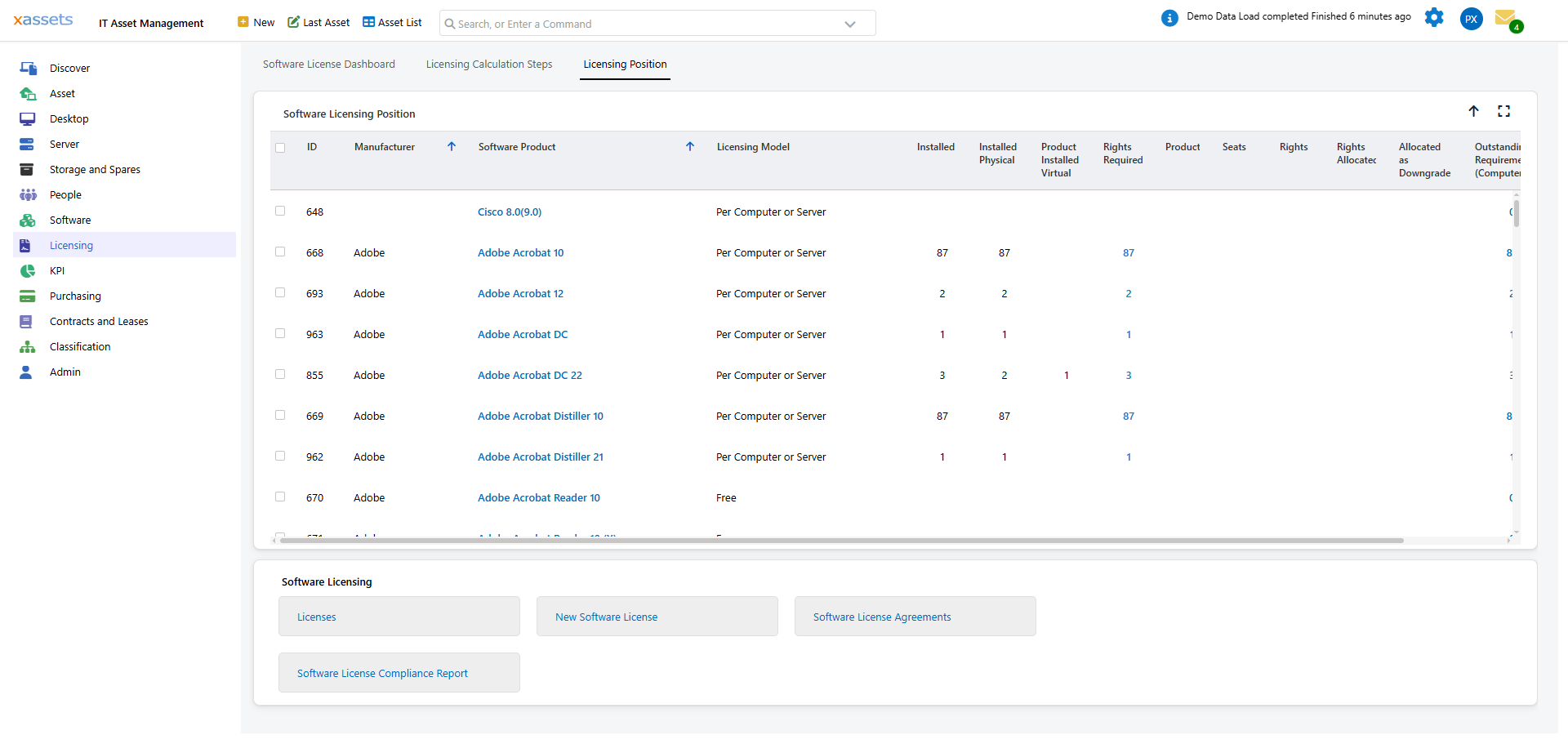
Reading the Columns
The columns most teams use day-to-day:
| Column | Meaning |
|---|---|
| ID | Internal product ID |
| Manufacturer | Publisher |
| Software Product | Catalog entry name |
| Licensing Model | The license type (Per User, Per Computer, Per Core, etc.) |
| Installed | Number of computers with the product |
| Installed Physical | Of the above, on physical hardware |
| Installed Virtual | Of the above, on virtual hardware |
| Rights Required | Demand in metric units (e.g., for per-core, total cores; for per-user, total users) |
| Seats | Total entitlement across all in-service licenses |
| Rights | Total entitlement after downgrade redistribution |
| Rights Allocated | Of demand, how much has been covered by grants |
| Allocated as Downgrade | Of allocations, how much used downgrade rights from a newer-version license |
| Outstanding Requirement | Unmet demand (the deficit) |
The full set of available columns is documented in the SoftwareProductValue CalcField definitions — these are the most useful for compliance work.
Filtering and Sorting
The grid supports the standard query filters. Common patterns:
| Goal | Filter |
|---|---|
| See only under-licensed products | Outstanding Requirement > 0 |
| Microsoft compliance only | Manufacturer = Microsoft |
| Per-user products | Licensing Model = Per User |
| Free products (excluded from compliance) | Licensing Model = Free |
Sort by Outstanding Requirement descending to see the worst gaps first.
Drilling In
Click a product to see its detail:
- The list of consuming machines (one row per asset)
- The licenses that cover it (with their per-license allocation counts)
- Per-machine compliance (which machines are covered, which are in deficit)
The drill-in is the working view for under-license remediation: it tells you which specific machines are uncovered.
What Counts as "Required"
The Required column shows demand in license metric units, which depends on the product's License Type:
| License Type | Required Counts |
|---|---|
| Per User | Number of distinct users with the product |
| Per Computer | Number of devices with the product |
| Per Core | Total cores across all consuming devices |
| Per Processor | Total processors across all consuming devices |
For a SQL Server Standard product (per-core) installed on 4 servers averaging 8 cores each, Required = 32. The same product on a per-user basis would be Required = number of users.
This is why setting the catalog entry's License Type correctly matters — the metric drives every column on this page.
Free Products in the Position
Free products appear with non-zero Installed counts and zero Seats / Rights / Outstanding. This is expected behavior — free products are tracked but not licensed.
To filter out free products from your compliance view:
- Apply a filter: Licensing Model ≠ Free.
- Or sort by Licensing Model so free products group at the top/bottom.
Why Numbers Look Wrong
| Symptom | Likely Cause |
|---|---|
| Required = 0 for a product you know is installed | Catalog entry has no defining titles, or the License Type is wrong |
| Seats = 0 for a product you know has licenses | License records' Status is not In Service, or the licenses' Software Product field is wrong |
| Outstanding much higher than expected | Catalog entry's License Type is per-core but should be per-user (or vice versa) |
| Numbers unchanged after adding licenses | Calculation has not been run since |
The diagnostic tab (License Dashboard → Licensing Calculation Steps) catches most of these — see Operations: Data Quality Checks.