We use cookies on our website to analyze website usage and to help secure the website against misuse.
Advertising and functional cookies are not used in our site or our web application products.
By clicking “Accept Essential Cookies Only”, you consent to us placing these cookies.
Learn how to build a complete full-lifecycle ITAM capability on top of Intune
Includes guidance on inventory gaps, reporting limits, integrations, and extending Intune with ITAM tools
Asset Management in Intune - A guide for MSPs
05 December 2025
Will Lambert
Why MSPs Rely on Intune
For most managed service providers (MSPs), Microsoft Intune has become an essential tool for endpoint management.
It is helpful in securing and managing Windows, macOS and mobile devices.
However, the problem with this approach arises when MSPs deal with clients whose businesses scale into complex environments.
Intune is great for endpoint management but can’t track many functions that MSPs must manage.
In a nutshell, MSPs can't use Intune as an IT Asset Management tool.
Here's some of the functions we will need which are not provided by Intune:
Asset location, ownership, and cost based allocations
Warranties and leases
Allow asset data to be viewed in your help desk
Software Asset Management
Asset Lifecycle events including Ordering, Receiving, Deployment, Movements, RMA, and Disposal
Tracking carbon emissions and other environmental measures
Reliability tracking
Zero trust and security reporting
Contract Management
Financial aspects of IT asset management
Other types of asset not stored in Intune
The above is almost a "todo list", and while you might not need all of them, almost all MSPs need many of these functions.
Strategically the right approach is to let Intune do its job - endpoint management - and use other tools like
xAssets ITAM to leverage Intune data and build a
full lifecycle IT Asset Management system with Intune as the base.
The Reality of Imperfect Client Environments
It is rare for clients to operate in perfectly managed conditions.
These unmanaged assets create messy tech environments: equipment gets lost, obsolescent servers remain powered on but undocumented,
cloud solutions are deployed without proper documentation,
and entire device categories never even interact with Intune.
This responsibility of managing an environment with hidden endpoints is an operational risk for MSPs.
This article explains why Intune alone can't deliver the solution MSPs are looking for and how utilizing a unified IT Asset Management (ITAM) lifecycle
is a more effective approach. Using an advanced ITAM platform like xAssets provides better asset visibility, excellent time to value,
efficient tracking, and reporting.
Why Intune Leaves Gaps in MSP Environments
Common Asset Types Intune Cannot See
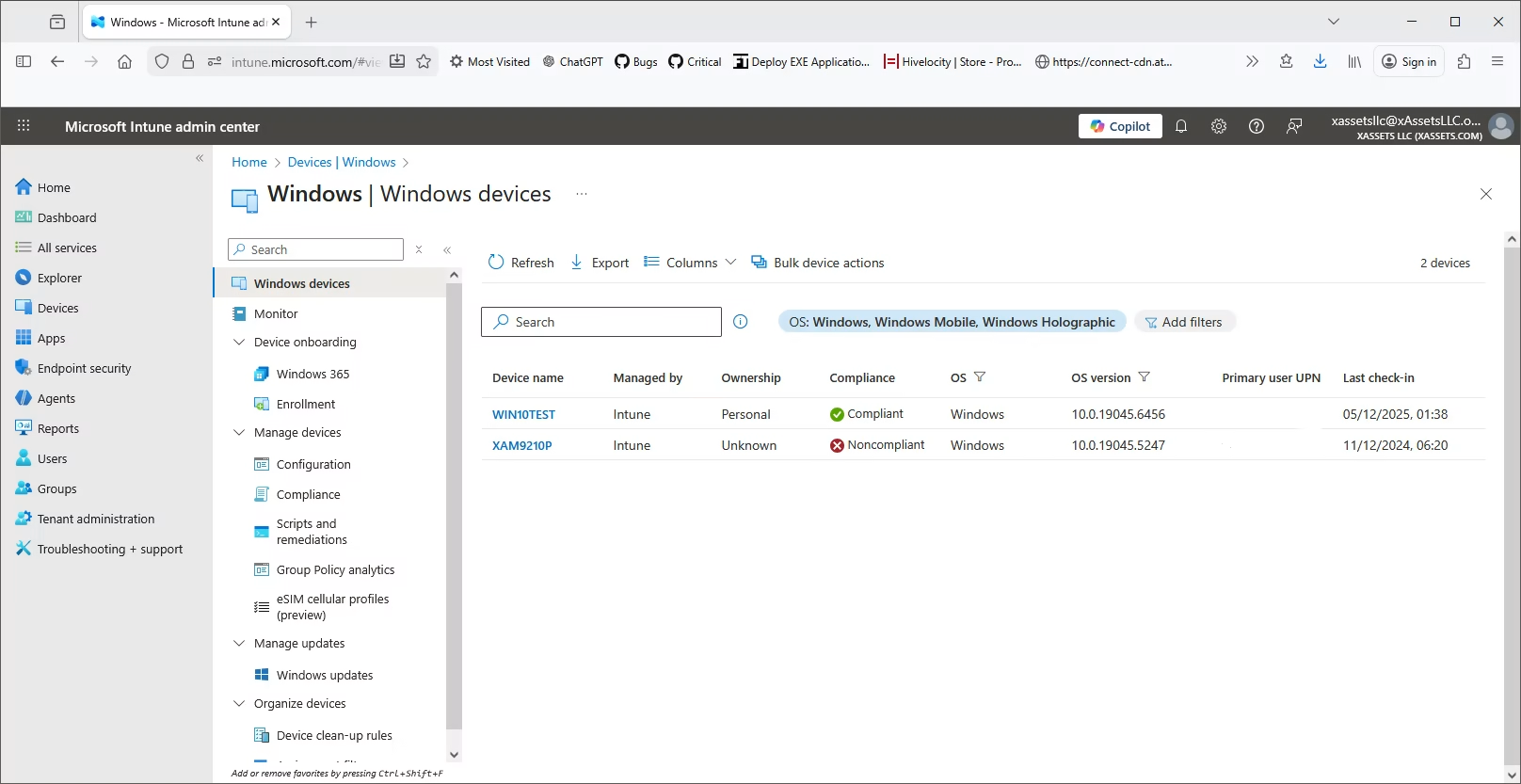
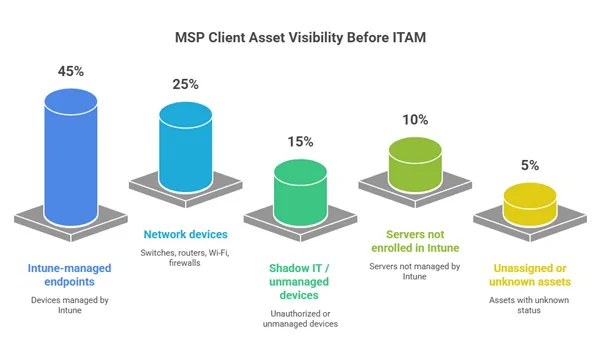
Intune is excellent at managing enrolled devices - but in reality, these make up just one piece of the puzzle. Realistic IT environments contain:
Obsolete servers
Network devices, printers, and switches
VMs, cloud workloads
Laptops and desktops that haven’t been enrolled
Unused and unmanaged SaaS licenses
Old equipment with legacy software still in use
In addition, although Intune collects data on some software titles, it does not provide a comprehensive view of all software installations on a PC - only those titles which it manages.
Using a discovery tool such as xAssets Network Discovery as part of an ITAM solution uncovers all installed software,
including unauthorized or unlicensed applications that may pose security risks.
The Impact of These Visibility Gaps
These asset categories are often undiscovered by Intune – meaning Intune cannot provide procurement, warranty or lifecycle data.
MSPs trying to manage these kinds of endpoints using Intune alone have a difficult time, resulting in inconsistent reporting and operational inefficiencies.
Integrations
Intune naturally integrates with apps like Entra, 365, Defender, SCCM, Teams, Windows Update, and other apps,
but only where needed to provide it's core functions.
Those integrations are not used to provide a comprehensive inventory, and that's what you need to create a central asset repository.
As well as a good discovery tool, a competent ITAM system needs connectivity to MS apps including Entra, AutoPilot, etc, and also
Purchasing, Accounts, Discovery Tools, Monitoring tools, Microsoft System Center, MDMs, and other sources of data.
Properly architected ITAM solutions integrate to all the apps and cloud services you have which store useful asset inventory data.
For example, xAssets integrates to these applications, centralizing data from all the apps you have into a centralized "single pane of glass":
What Advanced ITAM Adds That Intune Cannot
A Complete Approach to Asset Discovery
This is where Advanced ITAM comes in – filling the gaps that Intune cannot address.
It is essential that every asset, enrolled or not, is discovered and accounted for.
This requires a combination of agentless discovery, solutions for remote and mobile devices,
and the ability to track equipment that Intune cannot reach.
Unifying Data Into One Source of Truth
Adopting a system that ties together discovery information with procurement records, warranty data, support contracts,
lifecycle stages and disposal history allows you to make sense of your data since it’s all in one place.
Key Capabilities Advanced ITAM Provides
Capability
Microsoft Intune
Advanced ITAM
Value for MSPs
Device enrollment management
Core endpoint mgmt
Agentless discovery
Finds hidden assets
CMDB
Normalized, enriched data
Multi-tenancy
Limited
MSP operational model
Procurement & lifecycle
Full asset history
Contract/warranty mgmt
Cost savings
Workflow automation
Limited
Standardization
Advanced ITAM platforms add a set of capabilities complementing the limitations met when using Intune alone:
Agentless discovery and network scanning: allows hidden endpoints to be discovered including on-prem servers, networked devices, virtual machines and unmanaged desktops.
Data with details MSPs can actually use: purchase information, warranty status, contracts, suppliers, and location data.
Software licensing: linking installed software to the licenses that a client owns to identify under-used licenses to reduce overspending
Integrations: Intune can’t provide data from integrations in the same way that “Advanced ITAM” can – allowing MSPs to keep asset data in one place, taking advantage of automated changes.
Workflow Configurability: MSPs can set up standard workflows based on the client’s needs
One platform for all clients: Intune is tenant-bound, meaning that Intune can only manage devices inside that tenant. This creates the need for a client-segmented solution, resulting in a system where each client’s data is fully separate and secure, giving MSPs a centralized view for reporting, automation and tracking.
A Modern ITAM Architecture for MSPs
How Intune and ITAM Work Together
The approach for high-performing MSPs is to use ITAM in conjunction with Intune, filling the gaps in data while still utilizing Intune’s core features.
Data Normalization Through the CMDB
The process starts with discovery, using both agentless and efficient agent scans to capture a wide range of asset data, as well as importing data from Intune. Once devices have been discovered, the Configuration Management Database (CMDB) normalizes and cleans the data: duplicate records are removed, each device recorded by a unique identifier, and every asset has one complete record including purchase details, warranty info, servicing, licensing, location data etc.
Workflow Automation Across All Systems
A vital component of an Advanced ITAM environment also relies on the system’s ability to connect and integrate with all your other tools: Remote Monitoring and Management (RMM), Intune, Active Directory, JAMF – this enables automated updates that can trigger tickets and alerts. MSPs can utilize this to set up customized processes for their clients:
New user onboarding
Device setup
Workflows for leavers
Approvals for asset disposals
Warranty reminders.
Unified Visibility Across All Clients
Finally, an advanced ITAM approach is designed to give MSPs one clear view of all assets across each and every client. Dashboards, KPIs, and scheduled reports all rely on the precision of data from discovery and the proficiency of the CMDB in normalizing the data to produce accurate results – leading to a complete, detailed overview of each asset.
Rolling Out ITAM Across an MSP Practice
Pilot, Standardize, Scale
Successful MSPs do not deploy ITAM to their entire client base at once. Instead, they begin with a targeted pilot. They run a discovery scan, reconcile the results with Intune, import procurement information and create the first complete asset baseline the client has likely ever seen. Once the data is accurate, they define standard workflows for onboarding, offboarding and lifecycle transitions. Integrations with PSA and RMM follow, allowing service tickets and asset updates to remain in sync.
Early Wins That Drive Adoption
Within a single month, the MSP can generate its first meaningful win—often a license reclamation, a warranty risk report or a three-year refresh plan. That outcome becomes the template for repeatable ITAM implementation across the rest of the client portfolio.
This methodical, template-driven rollout is what transforms ITAM from a project into an operational discipline.
Where MSPs See the Most Business Value
Operational and Financial Gains
ITAM’s business impact thrives when asset lifecycle data is complete and reliable.
Here are some of the key benefits:
Faster Onboarding – Service providers no longer need to search through spreadsheets or email threads
Efficient QBRs - quarterly business reviews become data driven discussions
Better Compliance and Security posture – vulnerable asset identification made possible with advanced ITAM
Predictable budgets for clients – eliminate surprise costs
Higher Operational Efficiency – reduce time cost while improving service quality
The Importance of Configurable Workflows
Tailoring ITAM to Client Requirements
No two clients operate in the same way. A financial institution may require multi-step approvals for device disposal; a construction firm may need a simple, rapid onboarding process; a healthcare organisation may need strict tracking of devices used by clinical staff. Intune can’t accommodate these different client models because it isn’t designed to do so. Advanced ITAM platforms, however, can cater to these specific requirements.
A Competitive Advantage for MSPs
Configurable workflows allow MSPs to embody each client’s operating model in a repeatable, auditable process. They enable consistency across technicians, reduce human error and support scaling without service degradation. For MSPs growing into larger, more regulated client environments, this becomes a competitive differentiator.
Turning ITAM Into Recurring Revenue
Service Expansion for MSPs
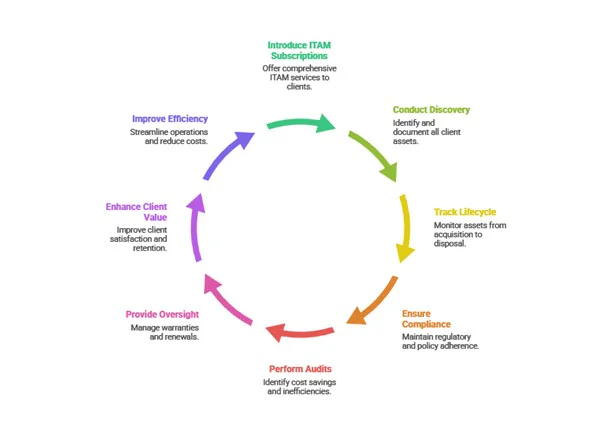
The shift from device management to asset lifecycle management naturally creates higher profit margins. MSPs introduce managed ITAM subscriptions that include continuous discovery, lifecycle tracking, and compliance reporting. They offer software licencing audits that identify unused subscriptions and overspend. They provide ongoing warranty oversight and coordinate replacements or renewals on behalf of clients. All these services enhance client value while giving MSPs the operational efficiency to preserve the MSP-client relationship.
Why ITAM Complements Intune
Intune remains important, but fails to bring everything MSPs need to the table. It is only through the implementation of ITAM alongside Intune that MSPs can transform endpoint management to deliver full lifecycle services.
Next Steps for MSPs
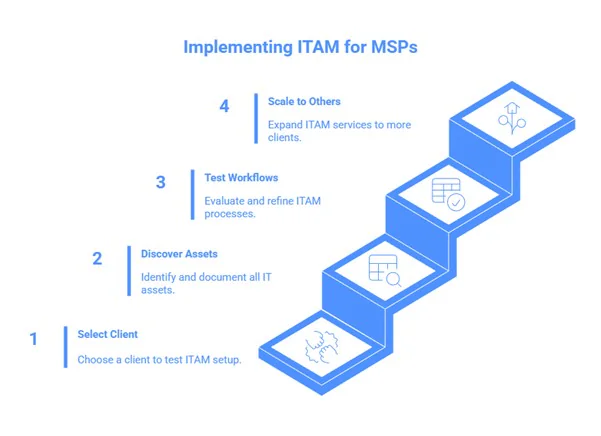
Start With a Single Client
The best way to get started is by selecting a single client where you can test your ITAM setup alongside Intune.
First, run a complete discovery of all devices including endpoints, servers, and any other hardware on your network,
and import and existing intune data. Also switch on integrations to AD and Entra so you get clear user data.
Check thoroughly that the asset records are accurate and as complete as possible including purchase details, warranties and licenses.
Test Workflows and Scale
Next, you can test the workflows and integrations you plan to use – e.g. automated alerts or ticketing for devices ready for disposal.
This will give you a good idea of how your processes work, and will raise any concerns before rolling-out on a bigger scale.
Once everything is running as it should, you can start to apply the same approach to other clients, following the same steps as in the test run.
MSPs that combine Intune and Advanced ITAM platforms like xAssets, gain complete visibility over their assets,
optimize workflow proficiency, delivering value through a tailored service to clients, regardless of the IT infrastructure they use.
xAssets also offers a consolidated instances alongside per-client instances, so MSPs can ask questions such as:
Which of my clients have vulnerabilities?
What is my overall position on Office 365 licensing?
Which clients are running Autodesk?
Which clients have inventory items which need replacing?
Frequently Asked Questions
Can Intune be used as an ITAM platform?
No - Intune works well as an endpoint management and security system, but doesn't support
the necessary integrations, discovery attributes, or processes needed to run IT asset management effectively
What asset types cannot be discovered by Intune?
Intune stores only the assets it manages. Network equipment, non-enrolled devices, and all non-network based
equipment are not stored in Intune
Why do MSPs need ITAM in addition to Intune?
MSPs need visibility across all clients, sites, and asset types.
Intune only covers enrolled endpoints and does not include procurement, lifecycle tracking,
contracts, warranties, software licensing, or financial data.
Can Intune be used for Software Asset Management?
No, Intune does hold some applications, but discovery tools and SCCM store much deeper information on the software
installed on an endpoint.
Can Intune cover workflows for procurement, receiving, deployment, storage, disposal?
Intune does not support procurement or lifecycle workflows. It has no modules for ordering, receiving, stock management, refurbishment, storage, or controlled disposal.
Get a Demo
What’s Included?
Demo shaped to your needs
Free instance
Free Instances Explained
Free instances are free forever and can show demo data or your data.
IT asset management free instances
Single user, 100 endpoints, 1,000 total assets
Includes network discovery (optional)
SNMP based devices are included free
Single Sign On (SSO)
Does not support Intune, SCCM, procurement, contracts, barcoding, configuration, or workflow
Fixed asset management free instances
Single user, 1,000 fixed assets
Includes all fixed asset register features
Single Sign On (SSO)
Does not support depreciation, CIP, procurement, barcoding, planned maintenance, configuration, or workflow