Parent Child Relationships
Parent-child relationships represent links between assets, such as a Server hosting a Virtual Machine, a Workstation with attached peripherals, or one asset that depends on another. These relationships help you understand how assets are connected and support reporting on dependencies and configurations.
Viewing Relationships
Open an asset in the editing screen and, in the left-hand menu, expand the Relationships group, then click Related Assets:
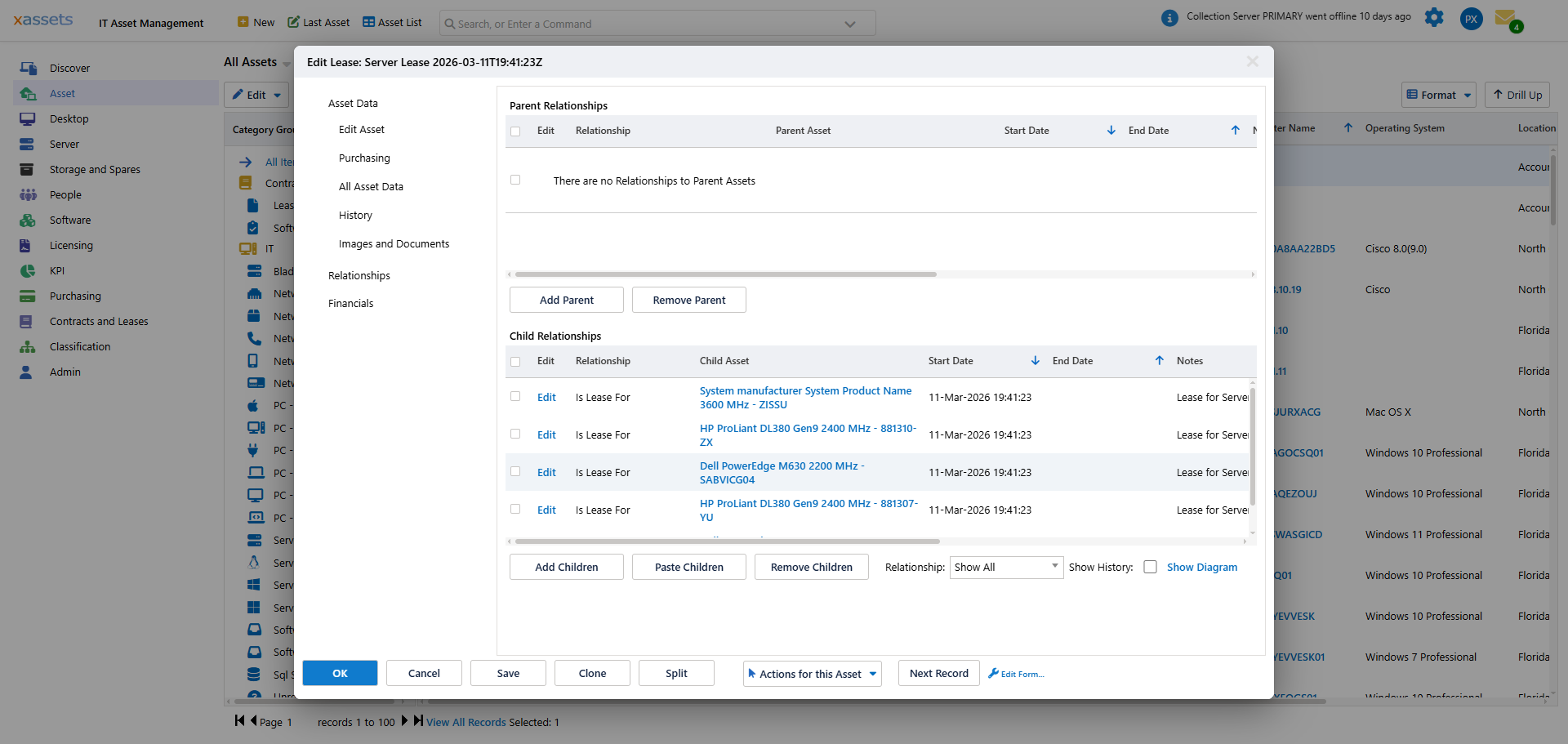
The Related Assets tab is split into two grids:
- Parent Relationships -- assets that this asset is linked below, with columns for Relationship, Parent Asset, Start Date and End Date.
- Child Relationships -- assets linked below this one, with columns for Relationship, Child Asset, Start Date, End Date and Notes.
If the asset has no links yet, each grid simply reads "There are no Relationships to Parent Assets" / "There are no Relationships to Child Assets" -- this is normal for a newly-created or unlinked asset.
Use the Relationship dropdown above the Child Relationships grid to filter by relationship type, and the Show History checkbox to include ended relationships. The Show Diagram link opens a visual map of the asset's relationships.
Creating Relationships
There are three methods for creating parent-child relationships:
Method 1: Add from the Related Assets Tab
- Open the parent or child asset in the editing screen.
- Click the Related Assets tab (under the Relationships group).
- Click Add Children to link assets below the current one, or Add Parent to link an asset above.
- A dialog appears where you select the relationship type and the target asset(s).
Method 2: Copy and Paste
- In a results screen (e.g. Asset List), select the assets you want to link as children.
- Choose Edit > Copy (or Copy Selected Rows) from the grid toolbar.
- Open the parent asset and navigate to the Related Assets tab.
- Click Paste Children to add the copied assets as children, then choose the relationship type.
There is no equivalent Paste option for parents -- use Add Parent for that direction.
Method 3: Drag and Drop
- In a results screen, select one or more assets.
- Drag them onto a parent asset in the same results list.
- A dialog appears confirming the action to take. Select the appropriate action (e.g., "Create Relationship").
Selecting a Relationship Type
When you create a relationship through any of the above methods, a dialog appears asking you to select the Relationship Type:
The relationship types available are configured in Asset Relationship Types (Classification area) and include:
| Relationship Type | Reverse Description | Typical Use |
|---|---|---|
| Has Component / Is Component For | Is Component For / Has Component | A monitor, keyboard, or peripheral belonging to a workstation |
| Has Peripheral / Is Peripheral For | Is Peripheral For / Has Peripheral | A peripheral device attached to a computer |
| Is Virtual Machine Host For / Is Virtual Machine Guest On | (as shown) | A physical server hosting a virtual machine |
| Is Connected To | Is Connected To | A device connected to a network switch or SAN |
| Depends On / Is depended on by | (as shown) | One asset that relies on another to function |
| Has Replacement / Is Replacement For | (as shown) | A new asset that replaced an older one |
| Contains / Is Contained By | (as shown) | An enclosure or chassis containing sub-assets |
Each type has a matching reverse description, so the relationship reads correctly from either side. Choose the appropriate type and click OK to create the link.
Editing and Removing Relationships
To edit or remove a relationship:
- Open the asset and navigate to the Related Assets tab.
- Click the Edit link next to the relationship entry to modify its type or details.
- Tick the row and use Remove Parent or Remove Children to delete a relationship.
Related Reports
Two report screens under Asset > Asset Data cover relationships across all assets, not just one at a time:
- Relationship List -- a flat grid ("Asset Relationships") of every Parent / Child pair with its Start Date, End Date and Dependency Type.
- Parent Child Relationships -- the same data broken down by the asset category tree, with the full asset column set (Custodian, Category, Serial Number, Computer Name, etc.) alongside each relationship.
- Relationship Map Report for an Asset -- a diagram view for a single asset, equivalent to the Show Diagram link on the Related Assets tab.
Tip: Relationships are bidirectional -- if Asset A is a parent of Asset B, then Asset B automatically shows Asset A as its child (using the type's reverse description). You only need to create the relationship from one side.
Warning: Removing a relationship does not delete either asset. It only removes the link between them. The assets continue to exist independently.
Related Articles
- Definition of an Asset - understanding asset types and classification
- Drag and Drop - creating relationships by dragging assets
- Editing Assets - the asset editing screen and its tabs