Asset History
Every edit made to an asset record is logged, creating a complete audit trail of changes over the asset's lifecycle. xAssets gives you two ways to see this: a per-asset History tab on the asset record itself, and an Asset History tab on the Asset Inventory Dashboard for finding recently changed assets across the whole database.
Viewing History for One Asset
- Find the asset you want to inspect (search by name, serial number, or asset tag)
- Open the asset editing screen by clicking its blue link
- Click History in the left-hand navigation panel (under the Asset Data group, alongside Edit Asset, Purchasing, All Asset Data and Images and Documents)
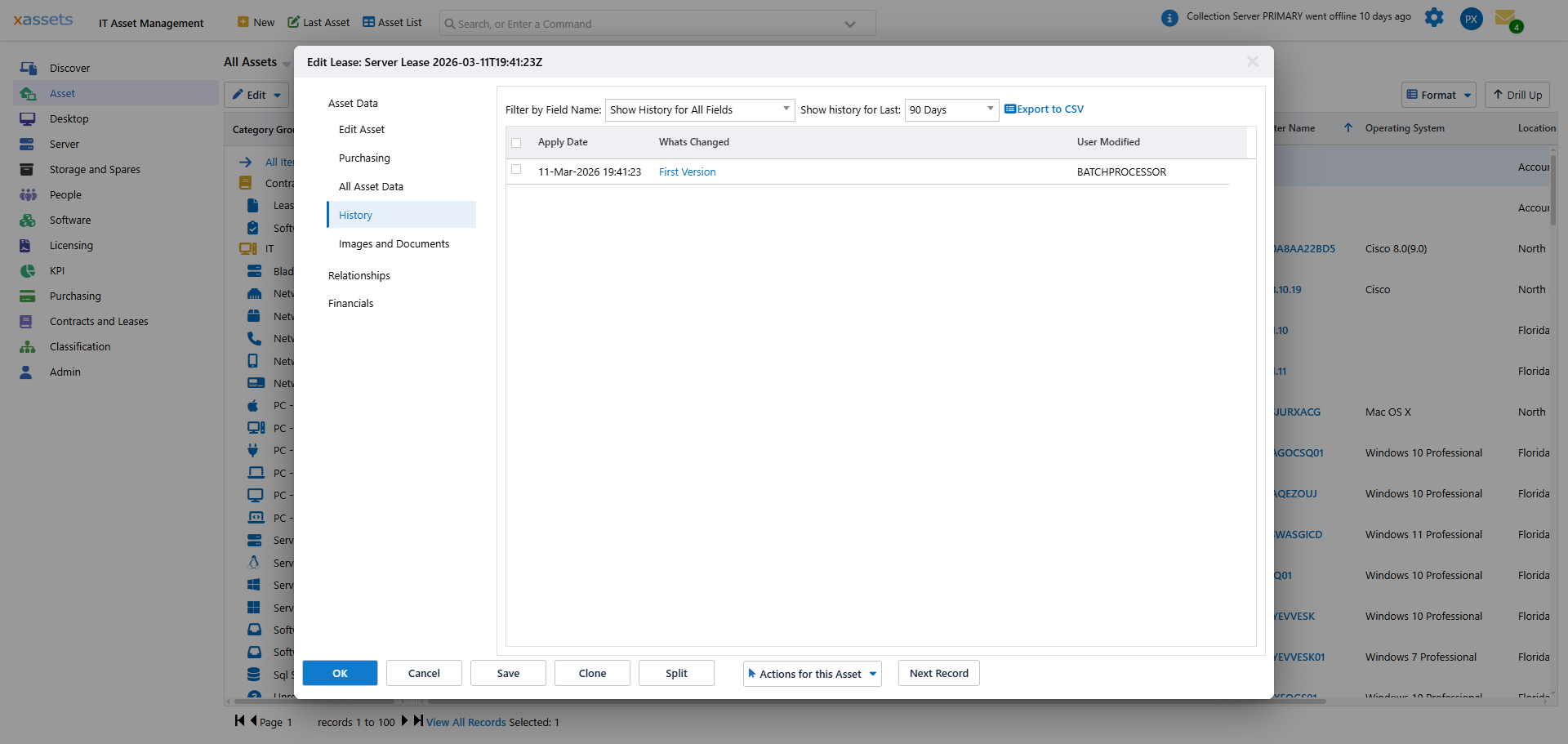
The History panel groups entries by change event. Each group is headed by the date/time and the user (or process) that made the change -- for example 08-May-2026 17:29:16 - BATCHPROCESSOR -- and lists the individual Field / Old Value / New Value rows changed in that event underneath. The very first entry for an asset (its creation) shows a First Version link instead of field rows, since there is no prior value to compare against.
Two controls above the grid narrow what you see:
- Filter by Field Name -- defaults to "Show History for All Fields"; pick a specific field to see only its changes (for example, just Location, or just Custodian)
- Show history for Last -- limits the time window (default 90 Days)
Use Export to CSV to pull the filtered history out for an audit or a spreadsheet.
Finding Recently Changed Assets: the Asset History Dashboard Tab
Go to Asset > Asset Inventory Dashboard and click the Asset History tab (it sits alongside Asset Inventory Dashboard, Inventory Queries, Additions and Changes, Asset Health and Disposal and Obsolescence). This tab is for scanning change activity across the whole estate rather than one asset at a time:
- Recent Assets For This User -- assets you personally have viewed or edited in the last 30 days
- Recently Created Assets -- assets created across the system in the last 30 days, including those loaded by discovery and integrations
- Recently Edited Assets -- assets modified in the last 30 days, regardless of who edited them
A panel of quick-access reports sits alongside these widgets, including Computers with Name Changes, Previous Custodians for a Specified Asset, Previous Assets for a Specified Custodian, and Previous Locations for a Specified Asset. Each of the "Previous ... for a Specified ..." links prompts you to pick an asset (or custodian) and then runs a report of its history for that dimension -- useful when you only need one slice of the audit trail (just custodian changes, just location changes) without opening the full History tab on the asset record.
Common Uses
| Use Case | What to Look For |
|---|---|
| Troubleshooting | Check when a hardware or software change occurred that might correlate with a reported issue |
| Audit | Demonstrate the complete lifecycle of an asset from creation to disposal |
| Dispute resolution | Verify when an asset was moved or reassigned, and by whom |
| Discovery verification | Confirm that discovery is detecting changes correctly by comparing history entries with known modifications |
Tips
- History records are created automatically -- no configuration is needed
- History is retained indefinitely by default. For large databases, discuss archival policies with your administrator
- Both manual edits (through the web interface) and automated changes (from discovery or integrations) are recorded, and the "Changed By" name in each group heading tells you which -- a real user name for manual edits, or the discovery/batch process name for automated changes
- If you notice unexpected changes in the history, investigate whether they came from a discovery scan or a user edit
- Use the dashboard's Asset History tab first when you are looking for "what changed recently" across many assets; use the per-asset History tab when you already know which asset you need to audit
Related Articles
- Additions and Changes -- reporting on changes across all assets
- IMAC Reporting -- structured change reporting
- Email Notifications -- getting alerted about specific changes