Email Notifications
Email notifications alert users when asset data changes - for example new assets being discovered, licensed-asset counts drifting, or batch jobs failing. Notifications use a subscription model: Configuration Users and Administrators define which notifications exist and how often they run, and end users subscribe to the ones relevant to their role.
Enabling Notifications
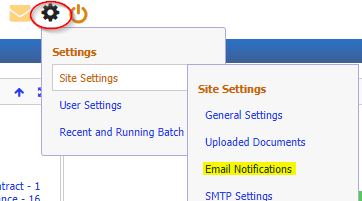
A set of default notifications ships with the system and can be reviewed through the Settings icon (the gear icon at the top right of the screen):
Managing Subscriptions (Administrator)
Click the gear icon and select Email Notifications to open the notification management dialog:

The dialog opens on the Subscriber Emails tab. The Available Subscriber Emails grid lists every notification that can be subscribed to, with its schedule status (Not Scheduled! until a schedule is set), last run date/time, and type (System Notification, Date Notifications, General Subscriber Emails). Select a row to work with it using the links below the grid - Add a new Email, Delete Selected Email, Schedule the Email, Set Notification Subject, Send the Email Now, and SMTP Settings:

Subscribers to selected Email (below the Available Subscriber Emails grid) shows which users are subscribed to the currently selected notification - User ID, User Group, Enabled, Name and Email. Use Add a Subscriber, Unsubscribe Selected Subscriber, Enable Subscription, or Disable Subscription to manage it. The grid reads "There are No Subscribers to the selected Email" until someone subscribes:
Click Schedule the Email to set (or change) how often a notification runs - start date, period (e.g. Days) and frequency - and to see any other schedules already defined for that notification. The Edit button next to the Transformation field opens the underlying Transformation record, where the Data Destination / Merge Type controls how the email is generated.
Targeted Emails
A second tab, Targeted Emails, is present in the Email Notifications dialog for notifications sent directly to specific recipients (users or distribution groups) rather than via subscription. In the current environment this tab did not render for the logged-in user (it was not available to select) - it may be gated by user rights or configuration. If you have access to it, the same Schedule / recipient controls used for Subscriber Emails apply.

Managing Your Own Subscriptions (End User)
Any user can manage their own subscriptions by clicking the envelope (Alerts and Notifications) icon at the top right of the screen and selecting My Notification Subscriptions. This opens the My Email Notification Subscriptions dialog, listing every notification available to subscribe to along with its ID, description, subscribed status, schedule, notification type and last run date:

Select a notification's row (its checkbox highlights) and click Subscribe or Unsubscribe below the grid:
A note at the bottom of the dialog is a useful reminder: subscriber emails are only sent once their schedule has been enabled, or when an administrator triggers them manually with Send the Email Now - if a notification you subscribe to never arrives, ask your System Administrator whether it has been put on a schedule.
Prerequisites
For notifications to reach a user, the following must all be in place:
| Requirement | Details |
|---|---|
| User-Custodian link | The user account must be associated with a Custodian record |
| Email address | The linked Custodian record must contain a valid email address |
| SMTP server | An SMTP server or IP address must be configured (the SMTP Settings link in the Email Notifications dialog opens this; it corresponds to the "MailServer" system setting) |
| Schedule enabled | The notification's schedule must be enabled (or it must be sent manually via Send the Email Now) |
| Transformation config | The notification's underlying Transformation must have its Data Destination set to Merge Type: "Email to Subscribers" |

Administrators and Configuration Users can update Custodian records to add missing email addresses.
Related Articles
- Additions and Changes - Tracking additions and changes to assets
- Asset History - Viewing the history of changes to an asset
- How to Configure Email Notifications - Step-by-step email notification configuration
- Batch Jobs - Scheduling automated tasks including notifications