Query Parameters
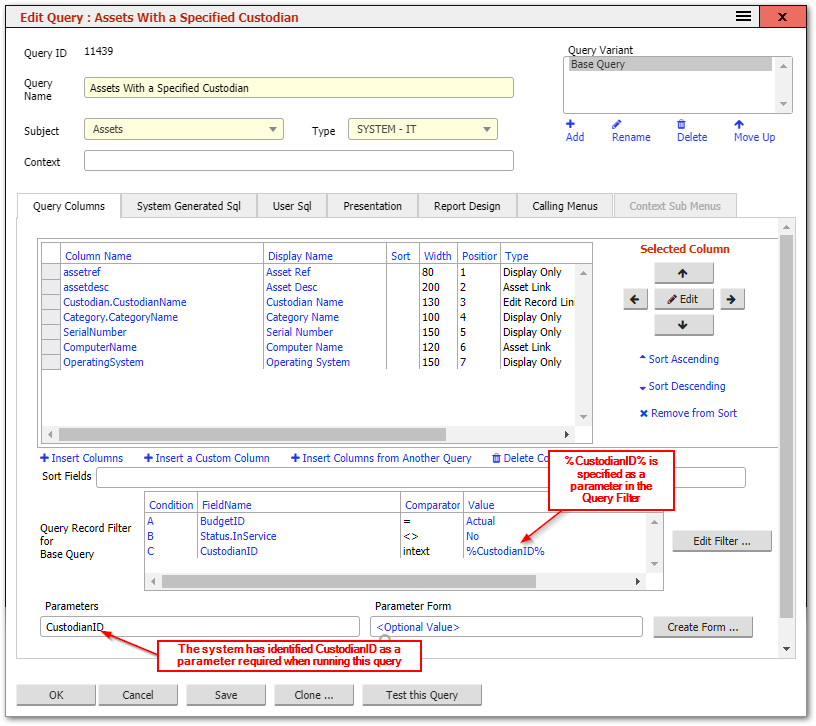
A query can have one or more parameters passed to it to tailor the results shown each time the query is run. Parameters are identified in Queries and their filters by a term surrounded by percentage signs such as %AssetID%. Parameters can have almost any name, but the name can help the system to determine what kind of data the parameter contains. For example, if a parameter is called %CustodianID% then the system knows that this will require a Custodian record’s ID and so, if a query using this parameter is run, the user will be presented with a dialog to select a Custodian. The selected Custodian’s ID would then be used as a parameter for the query and will be substituted for all occurrences of %CustodianID% in the query. An example of a query that uses this parameter is the query called "Assets With a Specified Custodian" which lists all the Assets that a selected Custodian record is the Custodian for:
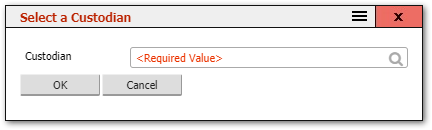
When this query is run, the system will automatically present the user with a dialog to select a Custodian:
If the parameter needs to include a list of records rather than just a single record, then it should end in the term list. For example, %AssetIDList%. This will prompt the user to select one or more Assets when this query is run.
For Asset records, there are several pseudo names available to identify the type of asset to be entered:
- Productid, productcatalogassetid or SoftwarecatlogEntry will prompt for a Software Catalog Asset
- ComputerID will prompt for an Asset that is a computer
- ContractID will prompt for a Contract Asset
- LeaseID will prompt for a Lease Asset
- LicenseID, LicenceID or productlicenseassetid will prompt for a Software License Asset
- TemplateID will prompt for an Asset Template
- MonitorID will prompt for an Asset in the Monitor category.
In addition, the name of the parameter can help determine how it is presented to the user in a dialog to input it, in cases where the parameter is not part of the system dataset. For example:
- If the parameter name includes the word Date in the name, the user will be prompted to enter a date.
- If the parameter includes the word Note in the name or the name starts with the letters, "txt", then a Large Text Area input will be expected.
- If the parameter name starts with the letters "int", "flt" or "lng" then a numeric input will be expected.
- If the parameter name starts with the letters "chk" or "bln" then a Checkbox will be used to get this parameter value from the user.
Tips for Using Parameters
- Name parameters carefully. The naming conventions above are not just cosmetic -- they control what input control the user sees. A parameter named
%StartDate%will present a date picker, while one named%StartValue%will present a plain text box. - Use list parameters (ending in "list", e.g.,
%AssetIDList%) when the user should be able to select multiple records. - Parameters in menus. When a menu item runs a parameterised query, the menu can pre-fill parameter values so the user is not prompted. See Menus -- Parameters for Queries and Transformations for details.
- Parameters in filters. Parameters can be used in query filter conditions as well as in User SQL. This allows a single query definition to serve multiple purposes depending on the parameters passed in.
Warning: Parameter names are case-insensitive but must be consistent throughout the query. If a filter condition uses
%AssetID%but the User SQL uses%assetid%, they will be treated as the same parameter, but using inconsistent casing can cause confusion during maintenance.
Related Articles
- Query Record Filters — using parameters in filter conditions
- Editing a Query — the query editor
- Advanced Query Techniques — parameters in User SQL
- Menus — passing parameters from menu items