Software Installed on a Computer
This page explains how to view the software installed on a specific computer. This is one of the most common ad-hoc tasks — whether for a user request, a security investigation, or a compliance spot-check.
Viewing Software on a Computer
- Find the computer by typing its name or username in the search box, or open it from Asset List
- Click the blue link to open the asset editing screen
- Expand IT Asset Management > Software in the menu on the left
The Software section provides several views of the installed software:
Licensable Products
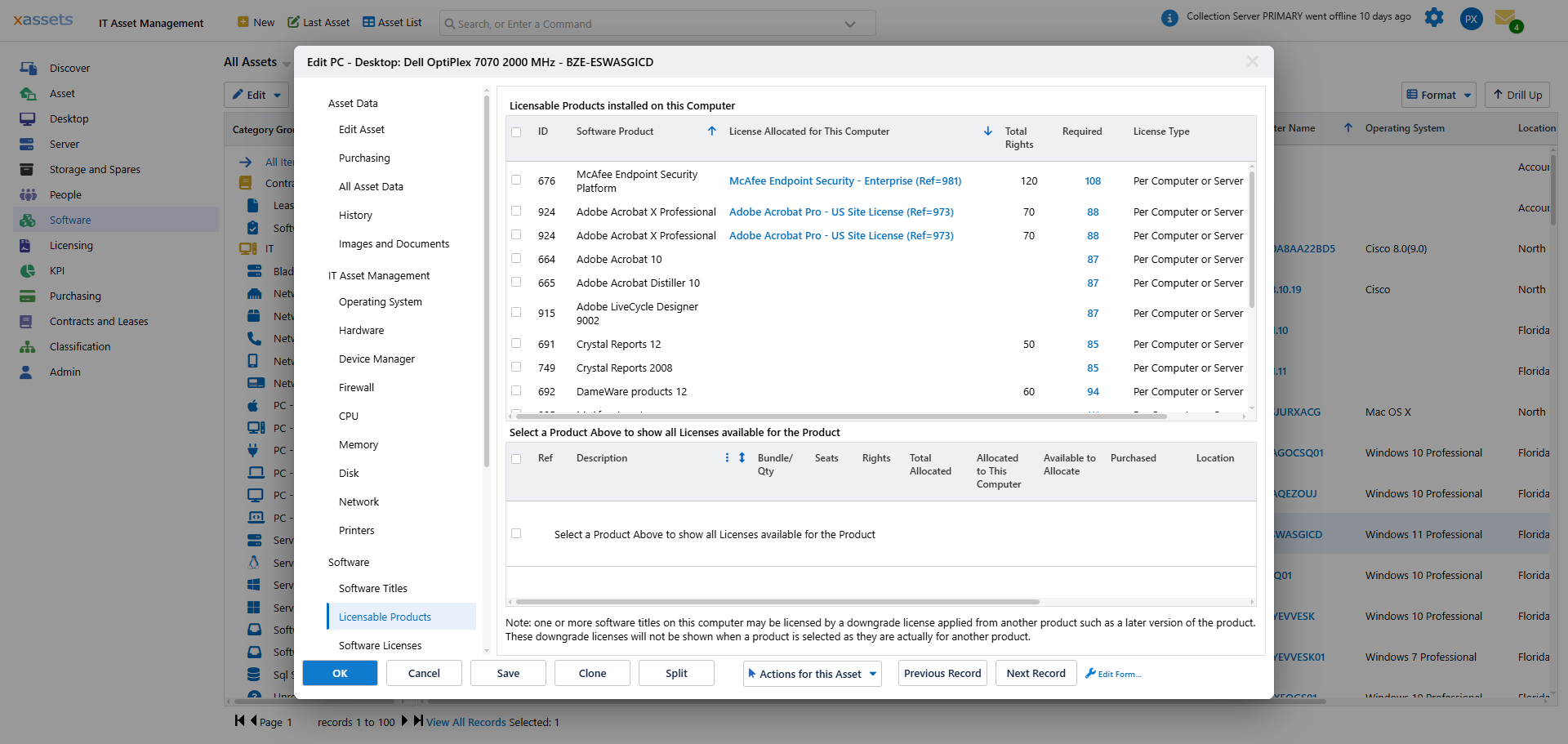
This lists the licensable products installed on this computer -- software that can be purchased and requires a license -- and, for each, the licence the last calculation allocated to this machine. Three columns help you assess the licensing situation:
| Column | Meaning |
|---|---|
| License Allocated for This Computer | The licence record covering this installation, or blank if the calculation found none |
| Total Rights | Total number of seats your organization owns for this product across all its licences |
| Required | Total number of computers (or users) consuming this product across the entire organization, including this one |
If Required exceeds Total Rights, the product is under-licensed and action may be needed. Tick a product to list every licence available for it in the lower grid, with the seats allocated to this computer and the seats still available. Products covered by a downgrade from a later version are noted underneath rather than shown against the later product.
Software Titles
With the Primary filter ticked (the default) this lists the software titles classified as Primary that are installed on this computer, with the publisher, the installation date where discovery could read it, and the first and last dates the title was seen. Primary titles are those the recognition engine has identified as significant, commercially-available software (as opposed to drivers, utilities, or system components). Currently Installed hides titles that have since been removed; the Selected Title menu shows the other computers carrying the same title.
Untick Primary for the complete list of everything discovered on the computer, including unrecognized software and titles classified as Secondary, FREE or UNKNOWN. Use this view when you need the full picture of what is installed, regardless of licensing status:
Software Keys
This option may be disabled in some installations. When enabled, it shows the registration codes (typically 25-character product keys) used to install software on this machine. This information is collected by the PCAnalyser agent during discovery.
Finding Computers Running a Specific Product
To see which computers have a specific software product installed:
- From the Software menu, choose Computers by Software Title - Primary. The tree on the left groups the titles by manufacturer:
- Click a title in the tree to filter the list to the computers that have it installed:
Finding Computers by Software Title
To search by individual software title rather than by product:
- Computers by Software Title — Primary shows only recognized primary titles
- Computers by Software Title — All includes free, unknown, and unrecognized titles
Warning: The "Computers by Software Title — All" query can take a long time to run in large installations because the left-hand title list may contain thousands of entries. Use the Primary view when possible.
Tips
- Use the Licensable Products view for quick compliance checks on a single machine
- Use Computers by Software Product when you know a product is under-licensed and need to identify which machines to remediate
- The All Software Titles view is useful for security audits — it shows everything installed, including potentially unwanted software
Related Reading
- Find Computers Running a Product — the per-product reverse view
- Recognition: Unrecognized Software — for unknown titles
- Software Catalog