Product Pricing
Knowing you are short of licences is useful. Knowing it will cost £48,000 to fix is what gets a budget approved. Catalog entries carry an indicative price so xAssets can put a number against a compliance shortfall.
Where the Price Comes From
Each catalog entry has an Amount — an indicative price for one licence of that product. It arrives in one of two ways.
Shipped with recognition data. xAssets maintains an indicative price against thousands of recognised titles, and it flows through into the catalog entry when the product is first recognised. You get costed compliance reporting without entering anything.
Set by you. You can edit the Amount on any catalog entry. Your figure is kept — the price arriving with recognition data only fills in an entry that has no price yet, so it never overwrites what you have entered.
That is deliberate. The shipped figure is a list price and a starting point. Your negotiated rate is better information, and xAssets treats it that way.
Setting a Price
Open the product from Licensing → Licensing Position and set Amount on the catalog entry, with Currency alongside it.
Prices are per licence, in the currency on the record. Use the price you would actually pay — your discounted rate, not list — because that is what makes the compliance figures worth showing to a budget holder.
Where a product is sold several ways at different prices, pick the one you would buy today. The figure is indicative; it is there to size a problem, not to produce a quotation.
What Uses the Price
Software Expenditure Needed for Compliance is the main consumer. It lists every product you are short on and what closing the gap would cost.
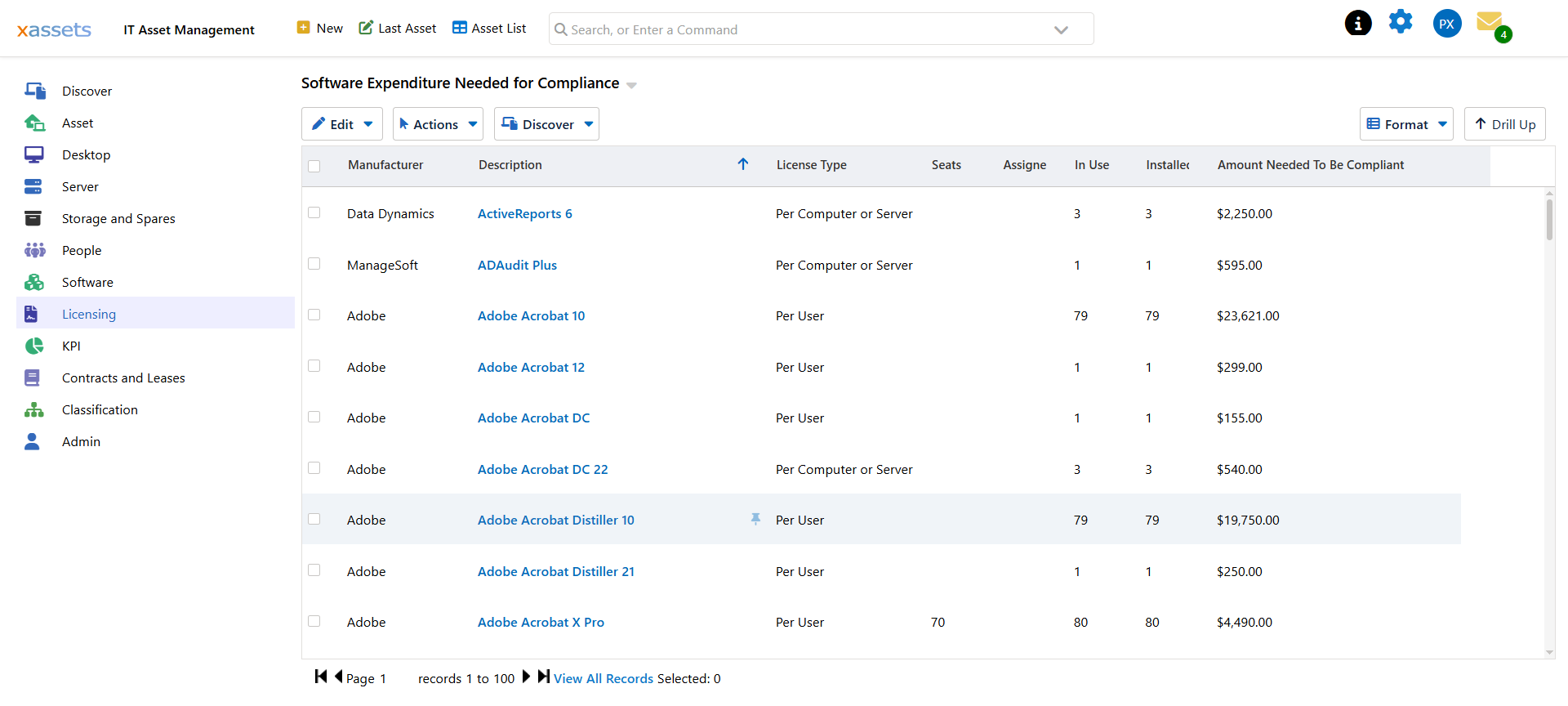
| Column | Meaning |
|---|---|
| Manufacturer / Description | The product |
| License Type | How it is counted |
| Seats / Assigned | What you own and what is handed out |
| In Use / Installed | What is actually being consumed |
| Amount Needed To Be Compliant | Shortfall multiplied by the catalog price |
A companion report groups the same figures By Manufacturer, which is the version to take into a vendor negotiation — it tells you what a single vendor relationship is costing you across their whole product set.
Prices also appear when creating a licence record, where the catalog price is offered as the default cost.
Reading the Numbers Honestly
The total is an estimate, and it is worth knowing where it is soft.
- Products with no price contribute nothing. A product with a shortfall and no Amount shows a gap but no cost, so the total understates. Check for priced-at-zero products before quoting a figure.
- List prices are not what you pay. Anything still carrying a shipped figure is a list price. Volume agreements, existing entitlements and true-up terms all move it.
- Free products should not appear. If they do, they are classified as licensable when they should not be — a recognition problem rather than a pricing one. See Free Products.
- The figure follows the last calculation. Run Calculate Licensing Position before quoting it.
Used with those caveats, it is the fastest way to turn a compliance position into a number somebody can act on.
Keeping Prices Current
Software prices move. A yearly review is enough for most estates:
- Run Software Expenditure Needed for Compliance and sort by amount.
- Check the prices on the products at the top — those are where an error costs most.
- Update anything renegotiated since last time.
Products at the bottom of the list rarely repay the effort of pricing precisely.
Related Reading
- Creating a Catalog Entry
- Compliance Reports
- Identify Under-Licensed Products
- Free Products
- Your Own Recognition Rules — the Cost field on a recognition rule