Intune reports the applications installed on each managed device, however it doesn't store purchases or entitlements,
so additional tools are needed to produce a license position. This article discusses how xAssets brings your Intune
data into a fully functional enterprise-grade Software Asset Management system to quickly provide a licenseable position.
The additional information needed to achieve a license compliance position includes:
- Entitlements - the Licenses you bought
- Software Product Catalog. A list of titles allowed or installed on your network
- Publisher licensing rules. This includes downgrade rights, upgrade rights, and suite members
- History to enable the position to be stated for the date a publisher asks about
Your MS subscription includes Microsoft 365, covering Office, Teams, Visio, etc,
a simple Entra API visit provides these entitlements and they load into
your xAssets instance automatically, including who they are assigned to.
Other publishers are not included in that load, so we import those separately, usually from Excel.
Can I get a software report from Intune?
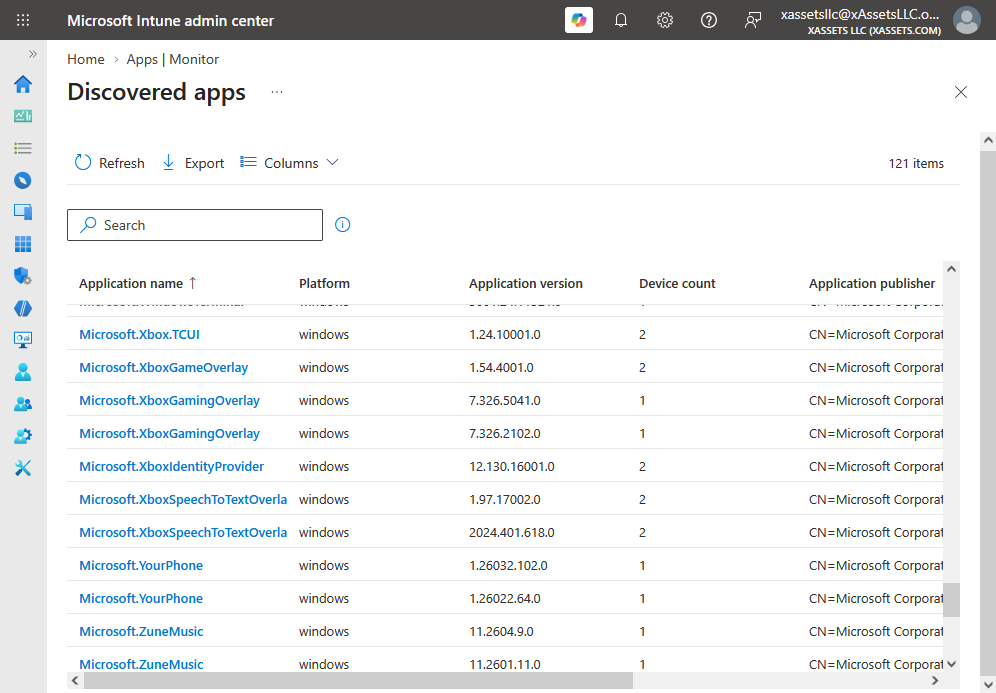
You can, but it's somewhat cryptic. In the Intune admin portal you can find it as follows:
- Apps
- Monitor
- Discovered Apps
Each row shows an application name, a version and a device count. The current view exports to CSV.
You can drilldown by clicking on a single app to see which devices it is installed on.
How can you track software licensing and installations in Intune?
xAssets automatically integrates into Intune inventory and allows you to import purchases, agreements and entitlements alongside your software usage.
Each managed device becomes an asset. The integration brings in serial number, manufacturer, model, operating system and
build, disk capacity, free disk space and the primary user, and applications are stored as child records with the asset, as installed software.
Our intelligent recognition system recognizes the raw application titles into properly normalized
software titles with Manufacturer, Product, Edition and Version.
Recognition knows which products need a license so free products, components, drivers and runtimes are classified as
secondary. A raw list of 40,000 installed titles resolves down to the few hundred products that are licenseable.
Tracking your software license position
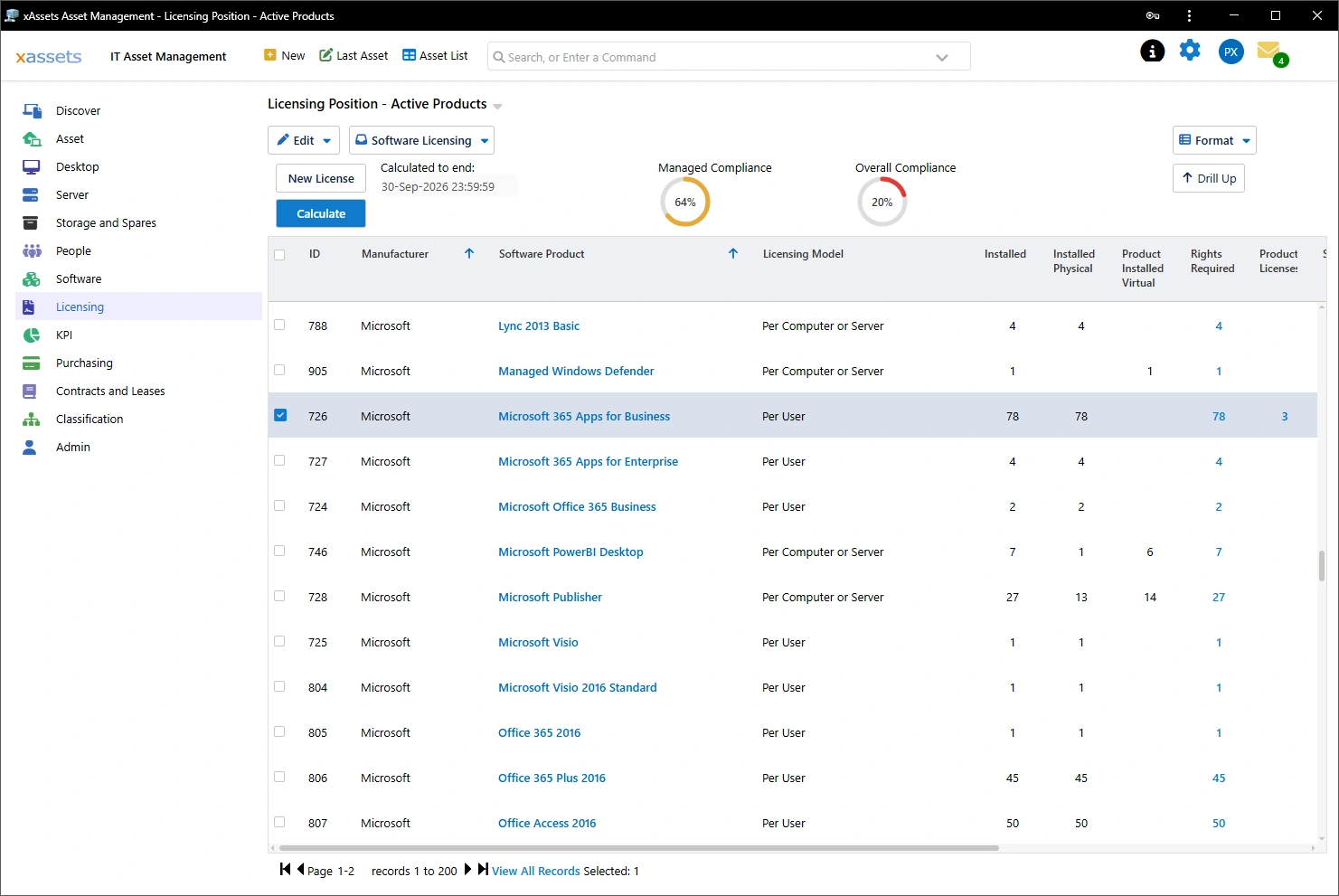
There are two sides to the Software licensing position, what you bought and what you use. We call these entitlements and consumptions.
xAssets holds licenses as records with a metric, a quantity, a purchase, an agreement and a term.
Licenses are entered by hand, imported from a spreadsheet, or pulled from a source system.
Microsoft 365 and Azure licenses are automatically imported for you and matched off.
SKU codes resolve to product names through a recognition set of 618 Microsoft SKUs, so the register shows easy to read titles like "Microsoft 365
E3"" instead of "SPE_E3". Suites are split into child licenses for the service plan it contains, and each child is linked to its
parent. Every license shows the users it is assigned to. When a user leaves, the allocation is removed on the next run and the
license returns to the pool.
The calculation engine is valid over all time periods - a temporal calculation engine -
whereas many SAM tools only provide snapshots.
Consumptions, rights and their associations are stored as accounting
transactions in a ledger.
To visualize this, think about a bank account for software: every change is logged as a transaction entry so
audit history is 100% proven.
The mechanism is covered in detail here:
Temporal Software Asset Management Calculation Engines.
Finding software from Intune
As soon as we have loaded your Intune data, the estate is easily searched by software title. Ask which devices hold a title. Ask which version each
one runs, who holds it, and when it was last seen. The same questions work for a manufacturer, a product family or an edition.
The most popular queries include:
- Every device holding a named product, with version and user
- Installations with no matching entitlement
- Entitlements with no installations
- "Old Software Titles " - Products below a support threshold, such as an unsupported Java or an old Acrobat - these are often considered a security risk
- Devices still on Windows 10
Unified software license compliance tracking with Intune data
Any of these can be saved, scheduled and emailed. The register can also infer and store
location, department and cost centre, and these can be used to filter the data further.
Finding banned software from Intune
Intune doesn't have the concept of a banned product, and this classification should be set in the software catalog
since it vary over time and between customers.
In xAssets a product is classified through Classify Software Titles, and "Banned Software" is one of those classifications.
About 150 rules are
already classified that way, covering remote access tools, torrent clients, key generators and crypto miners. Anything else is
classified in a few seconds. The classification then applies to every installation of that product across the estate, including
installations discovered next month.
A banned product doesn't need a license, instead it is displayed as a security issue. Any asset holding
one raises a Banned Software Detected health issue at High severity and this data is shown
within the health dashboard and within the Software menus
The removal is done through Intune. The device list from the health issue is the target list for an uninstall assignment. The
next sync confirms the product has gone.
The devices missing from Intune
Intune covers enrolled endpoints, but it refuses to store servers and other types of devices.
A software audit usually covers every device that runs software including servers.
These devices typically sit outside a typical Intune tenant:
- Windows and Linux servers
- Virtual machines and the hosts they move between
- Macs and Linux desktops
- Network equipment, printers, IP phones, any SNMP or SSH kit
- Contractor and BYOD machines that were never enrolled.
SQL Server, Oracle and SAP are licensed by core or by processor, so the cost per server is high -
you'll need to track license compliance on these devices even though Intune cannot report on them.
xAssets Network Discovery discovers these agentlessly. An agent is available for machines that are
rarely on the corporate network such as "work from home" machines and standalone/rented servers.
Discovered devices load through the same route as the Intune sync. The register holds one row
per device, with a source of INTUNE or the discovery source that found it. A device found by both is one asset.
Discovery also provides much greater detail than Intune, with a deep dive on CPU, Memory, Disk, Devices, Motherboard, Software Versions, and about 200 more data sets per machine!
A holistic solution for Intune ITAM and SAM
Intune is an endpoint manager and doesn't cover Asset Management or SAM.
xAssets provides an asset register with deep storage capability for rich IT endpoint data including software,
and a fully recognised software catalog, entitlements and history.
What that adds on top of the Intune data:
- Intelligent software recognition covering approx 1 million known products
- A license position calculated from entitlements, provable at any past date
- Processes for joiners and leavers including software license assignments
- Microsoft 365 and Azure licenses imported with per-user assignments, and reclaimed when a user leaves
- Banned software detection, with the device list to act on.
- The devices Intune does not see, from agentless discovery and from integrations to SCCM, Tanium, JAMF, Meraki, AWS, Azure and ServiceNow.
- Purchase orders, contracts, renewals, warranties, disposal and the rest of the asset lifecycle.
- Reporting, dashboards and scheduled reports
- A temporal record of your software compliance over all time
Implementations often have data present from Intune and Azure licenses loaded on day one,
depending on customisation requirements -
so at the end of the first day you can see your Microsoft desktop licensing compliance position,
at least for those products which are listed in Azure's licensing store.
The Intune sync itself is usually configured in less than an hour, and multiple Intune instances are supported.
Frequently asked questions
What permissions does the Intune sync need ?
An app registration in your tenant with read-only application permissions for Microsoft Graph.
DeviceManagementManagedDevices.Read.All covers the device list and the detected applications.
User.Read.All and Directory.Read.All cover primary users and license assignments.
How long does the first sync take ?
Microsoft Graph API restricts the numbers of fetches you can do in a time period, so the process has to run slowly.
It takes 15 minutes for 500 PCs, for 3,000 PCs the sync takes about 2 hours,
for 25,000 PCs we set an overnight job and the time varies but 5-6 hours is typical.
Does this replace Intune ?
No. Intune keeps managing and deploying to devices. xAssets consumes the Intune inventory and adds the asset
register, software catalog, entitlements and reporting - thus giving you clear visibility of at least five important questions: what you have,
who has it, where is it, what's installed, and what's the software licensing compliance position.
How does the system know where an Asset is ?
The IP address is retrieved from Intune. IT administrators can upload a network segment to location
excel sheet so that xAssets can map any subnet to a location. This enables us to fill in the location
of each asset while it is being imported from Intune.
Even without an IP to location lookup,
the location of the user can also be configured to be inherited by the Asset, so the location
of a user set in Entra is sufficient to set the location of the Intune device.
Is the reported licensing position reliable ?
Intune doesn't scan the hard disk of every PC for software titles, so any hidden titles or titles which
run as services without registration in Programs and Features might not be listed. xAssets Discovery
fully audits the disk of a PC for a complete inventory, but with Intune data alone, the position is only
reliable for those titles which are reported. xAssets will help with software recognition where needed, so unrecognised licenseable titles in
Intune will be added to the recognition database as part of the service.
Further reading