Task and Incident Entry
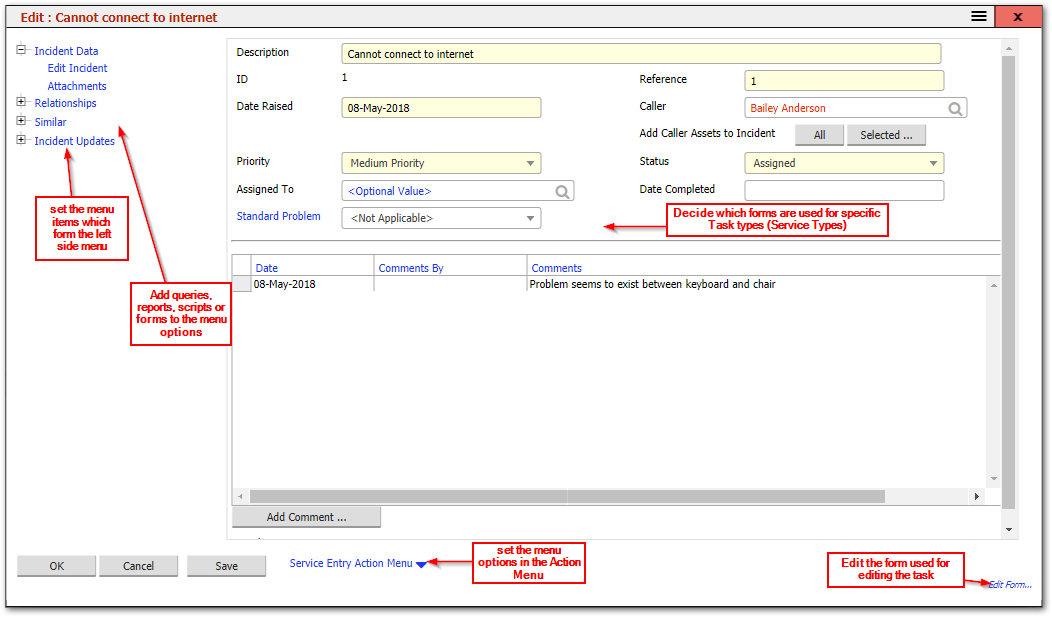
- Set the menu items which form the Left Side Menu
As in the asset entry screen, the left side menu can be configured from the menu command builder
- Add queries, reports, scripts, or forms to these left side menu links
Tasks have a service Type Code which can be used to determine what menu items appear in the left menu so that, for example, Incidents can have different menu options from Change Requested
- Edit the Form used for editing the Task
The main form is a standard form of type "Incidents and Tasks", and the system supports different forms for different Task Service Types.
Related Articles
- What Can Be Configured Overview — Overview of all configurable areas
- Asset Entry — Configuring the asset entry screen
- Forms — How forms can be configured
- Forms Overview — Detailed guide to forms and the form editor
- Tasks — Using the tasks module