Splitting Assets
Splitting turns one asset record into several. It is how you break a bulk purchase into individually tracked items, and how you divide a multi-seat software licence so parts of it can be managed separately.
When to Split
- A purchase received as one line — twenty identical monitors — that now needs tracking as twenty assets in different places.
- A software licence bought as one agreement, where blocks of seats belong to different departments or cost centres.
- Any record that has to be in two places at once, which usually means it should never have been one record.
Splitting keeps the financial history intact, which is what makes it different from simply creating new records and deleting the old one.
Splitting a Software Licence
Open the licence and click Split.
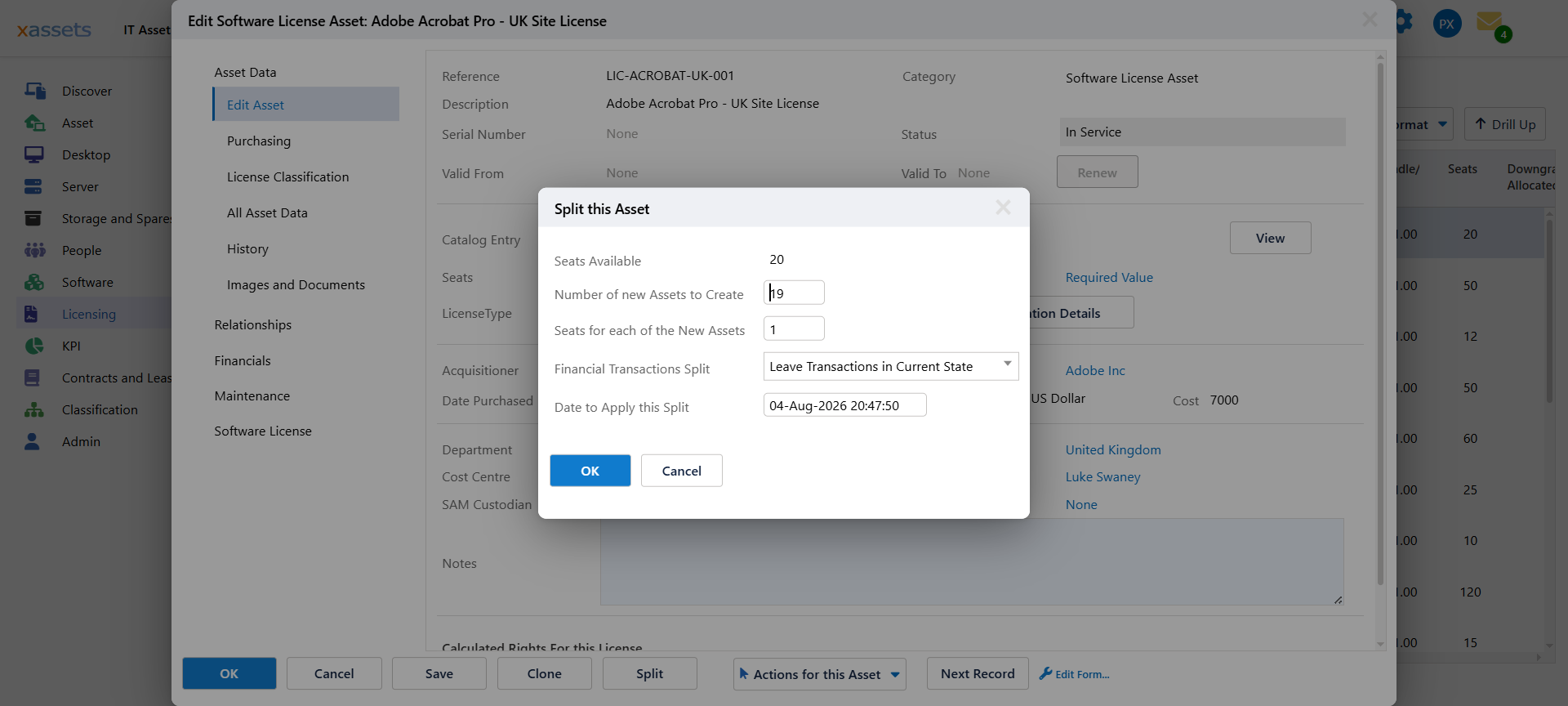
| Field | Meaning |
|---|---|
| Seats Available | Seats on the licence now — shown for reference |
| Number of new Assets to Create | How many new licence records to make |
| Seats for each of the New Assets | How many seats each new record carries |
| Financial Transactions Split | How the original cost is divided across the results |
| Date to Apply this Split | The effective date |
The two middle fields multiply. A 20-seat licence split into 4 new assets of 5 seats each moves 20 seats out, leaving nothing on the original. Split into 3 new assets of 5 seats each, and the original keeps 5.
Check the arithmetic before clicking OK. The dialog will let you move out more seats than the licence has. Seats available, times new records, times seats each — the numbers should land where you intend.
Splitting Other Assets
The same dialog handles any asset. For a quantity-based record — twenty monitors on one line — you are dividing the quantity rather than seats, and the numeric field being divided is the one configured for your system.
Which numeric fields are divided on a split is configurable, so if a field you expect to divide is being copied to every new record instead, that configuration is the place to look. See Settings.
What Happens to the Financials
The Financial Transactions Split option controls whether the original cost is divided across the resulting records or handled another way. Dividing is normally what you want — ten assets from a £10,000 purchase carrying £1,000 each keeps the total honest.
For fixed assets under depreciation this matters more than it looks, because the split has to leave the book value intact across the new records. See the Fixed Asset Management Guide before splitting depreciating assets.
After a Split
- Rename the results. New records inherit the original's description. On a licence split by department, say so in the description or the records are indistinguishable.
- Set what differs. Location, cost centre, department and custodian are why you split; set them on each new record.
- Recalculate licensing. Splitting a software licence changes how seats are held. Run Calculate Licensing Position so compliance reflects the new shape.
Before You Split
Splitting is not reversible — there is no single action that puts the pieces back. Where a split is only for reporting, consider whether a query grouped the way you need would do the job instead.
If you do need it, check the seat or quantity arithmetic first, and split once rather than repeatedly in small pieces.
Related Reading
- Editing Assets
- Bulk Update — changing many assets without splitting
- Assigning Licenses to Users — dividing seats between people without splitting the record
- Running the Calculation